
PosterBooking is the best free multi-screen starting route if you want to test up to 10 displays before committing to a paid network. Yodeck is the best popular all-rounder. OptiSigns is best when you want interactive screens and business applications. ScreenCloud is best when you want to turn existing workplace content into managed internal communications. Rise Vision is best for schools. Xibo is best when you want to host the CMS yourself. TelemetryTV is best for live dashboards and developer-led networks. Samsung VXT is best when you are standardizing on Samsung commercial displays.
You can get almost any credible digital signage platform to show an image on a television. That is the easy part.
The problems start after you add more screens. Someone forgets to remove an expired promotion. A branch manager changes the wrong playlist. A player disconnects. The software reports that content was published, but nobody knows whether the display is actually on.
Then there is pricing. A platform that looks inexpensive at $8 per screen can become costly when you add 50 displays, advanced permissions, proof of play, or premium support.
Hardware is changing too. Amazon launched the Amazon Signage Display on October 15, 2026, combining a 55-inch 4K screen and media player in one device.
You get:
- A built-in signage player
- Wi-Fi 6
- Ethernet
- Miracast
- Amazon Signage Manager
- Support for more than 80 digital signage CMS providers
According to 2026 (Amazon) on the Amazon Signage Display launch, the first model is available in the United States, with additional sizes planned. It uses the same Amazon portal, mobile application, and CMS ecosystem as the Amazon Signage Stick.
That gives you 2 practical options:
- Connect an Amazon Signage Stick to a screen you already own.
- Buy an Amazon Signage Display when you need a new 55-inch screen and player.
PosterBooking, Yodeck, OptiSigns, ScreenCloud, and Rise Vision appear within Amazon’s CMS ecosystem. Amazon manages the hardware environment, while your selected CMS manages content, playlists, and schedules.
Now, that distinction will become more relevant in 2027. According to 2026 (The Business Research Company) on the digital signage software market, software revenue is forecast to grow from $14.32 billion in 2026 to $22.76 billion in 2030 at a 12.3% compound annual growth rate. Applying that growth rate to the 2026 figure gives an estimated $16.08 billion software market in 2027. That is my calculation from the published forecast, rather than a separate figure reported by the research company.
For you, the implication is simple. You will see more platforms, more AI features, and more hardware combinations. You will also encounter more ways to pay for features you do not need.
I analysed current vendor documentation, live pricing pages, product announcements, G2 review patterns, Capterra reviews, and practitioner discussions. I have not claimed hands-on testing because no controlled testing data was provided.
Prices, ratings, compatibility, and plan limits were checked through November 24, 2026. When I discuss a 2027 product direction, I am interpreting released features and documented transitions. I am not presenting an unreleased feature as confirmed.
Table Of Contents
- How I Evaluated the Best Digital Signage Software for 2027
- Top Digital Signage Software for 2027
- 1. PosterBooking: Best Free Multi-Screen Start With Fixed-Price Growth
- PosterBooking’s strongest review theme
- How PosterBooking works day to day
- PosterBooking and Amazon Signage Display
- What PosterBooking is building toward in 2027
- What I like
- What users like
- What I dislike
- What users dislike
- 2. Yodeck: Best Popular All-Rounder
- What users discuss most
- What Yodeck appears to be building toward in 2027
- What I like
- What users like
- What I dislike
- What users dislike
- 3. OptiSigns: Best for Interactive Screens and Business Applications
- What users say most about OptiSigns
- Remote management in everyday use
- What OptiSigns appears to be building toward in 2027
- What I like
- What users like
- What I dislike
- What users dislike
- 4. ScreenCloud: Best for Workplace Communications
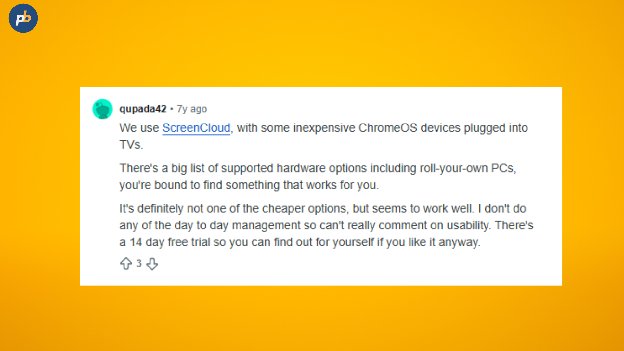
- When ScreenCloud makes sense for you
- ScreenCloud Studio, Arc, and Amazon Signage Display
- Closest alternatives: Yodeck and Appspace
- What ScreenCloud appears to be building toward in 2027
- What I like
- What users like
- What I dislike
- What users dislike
- 5. Rise Vision: Best for Schools and Education
- Why schools choose Rise Vision
- Closest alternative: Yodeck
- What Rise Vision appears to be building toward in 2027
- What I like
- What users like
- What I dislike
- What users dislike
- 6. Xibo: Best for Self-Hosting and Infrastructure Control
- Xibo pricing and deployment options
- What users like and where they struggle
- Closest alternative: PosterBooking
- What Xibo is moving toward in 2027
- What I like
- What users like
- What I dislike
- What users dislike
- 7. TelemetryTV: Best for Live Dashboards and Developer-Led Networks
- What users like and dislike
- Closest alternative: OptiSigns
- What TelemetryTV is moving toward in 2027
- What I like
- What users like
- What I dislike
- What users dislike
- 8. Samsung VXT: Best for Samsung Commercial Display Fleets
- When VXT makes sense for you
- What users say about Samsung VXT
- Amazon Signage Display as the closest alternative
- What Samsung appears to be building toward in 2027
- What I like
- What users like
- What I dislike
- What users dislike
- Hardware and Digital Signage Trends That Matter in 2027
- How to Choose Digital Signage Software for 2027
- Final Buyer Guidance
- Frequently Asked Questions
- What is the best digital signage software for 2027?
- Is PosterBooking free in 2027?
- Is AbleSign an alternative to PosterBooking?
- Why is PosterBooking ranked above Yodeck?
- What is the Amazon Signage Display?
- Does PosterBooking work on the Amazon Signage Display?
- Is the Amazon Signage Display better than the Amazon Signage Stick?
- Can you use Yodeck, OptiSigns, ScreenCloud, or Rise Vision on the Amazon Signage Display?
- Can you use the Amazon Signage Display outdoors?
- Can the Amazon Signage Display run continuously?
- Does the Amazon Signage Display include free CMS software?
- Which platform is best for one screen?
- Which platform is best for 5-10 screens?
- Which platform is best for interactive kiosks?
- Which platform is best for workplace screens?
- Which platform is best for schools?
- Which platform supports self-hosting?
- Which platform is best for live dashboards?
- Should you use a Fire TV Stick for digital signage in 2027?
- What should you test before buying digital signage software?
How I Evaluated the Best Digital Signage Software for 2027
I ranked each platform by the job it performs better than its closest alternative. I did not reward a product simply because it offers playlists, templates, scheduling, and remote updates. You can already get those functions from most credible signage platforms.
The ranking uses 6 weighted factors:
| Evaluation factor | Weight | What it tells you |
|---|---|---|
| Publishing and scheduling | 20% | How easily you can create, approve, schedule, and replace content |
| Device reliability and compatibility | 20% | Whether your player supports offline playback, automatic startup, monitoring, and recovery |
| Remote management and governance | 20% | How you control locations, roles, screen groups, and device health |
| Total operating cost | 15% | What you will spend on software, hardware, support, and staff time |
| Specialist capability | 15% | Whether the platform solves your alert, dashboard, interaction, workplace, or hosting requirement |
| Independent user evidence | 10% | What review volume and recurring user feedback reveal |
I applied a separate age check to volatile information:
- I prioritized live vendor pricing over older directory listings.
- I used November 2026 G2 data where available.
- I checked current compatibility documentation.
- I separated launched features from roadmap signals.
- I identified conflicting prices instead of averaging them.
- I checked whether a free plan was permanent, restricted, or time-limited.
That last check matters more than it sounds. One provider might give you one screen free forever. Another might give you 10 screens for 3 months. A third might offer an ongoing free service under a fair-use policy.
All 3 can call themselves free, but they solve different problems.Discussions within digital signage practitioner communities in 2025 raised firmware, networking, support, player lock-in, and site visits alongside CMS features. That pattern confirms what feature tables often miss. You are buying a screen operation, not merely a content editor.
Top Digital Signage Software for 2027
| Rank | Software | Best for | Current starting point | Amazon Signage Display position |
|---|---|---|---|---|
| 1 | PosterBooking | Starting a multi-screen network free and scaling under fixed-price plans | Up to 10 screens free for 3 months | Official Amazon Signage CMS provider |
| 2 | Yodeck | A popular general-purpose signage platform | 1 screen free, then $8/screen/month annually | Listed Amazon Signage CMS provider |
| 3 | OptiSigns | Interactive signage, dashboards, and business applications | Standard at $9/screen/month annually | Officially supports the Display and Stick |
| 4 | ScreenCloud | Workplace communications and distributed content contributors | Core at $20/screen/month annually | Listed Amazon Signage CMS provider |
| 5 | Rise Vision | School announcements, sharing, and emergency communication | School Basic at $119/display/year | Listed Amazon Signage CMS provider |
| 6 | Xibo | Self-hosting and infrastructure control | Community Edition CMS is free to self-host | Verify support for your selected player |
| 7 | TelemetryTV | Live dashboards and developer-led screen networks | Entry at $8/device/month annually | Not used as ranking evidence |
| 8 | Samsung VXT | Managing supported Samsung commercial displays | Quote-based | Separate hardware and CMS ecosystem |
You should not compare those entry prices as if they include the same capabilities. Xibo can remove the CMS license, but you become responsible for the server. ScreenCloud costs more, but it targets a more structured workplace communication process.
PosterBooking gives you more free screens at the beginning, but that free period currently lasts 3 months. The right product depends on what you need after the trial ends.
1. PosterBooking: Best Free Multi-Screen Start With Fixed-Price Growth
PosterBooking is the best choice when you want to test a real multi-screen network without paying for the software on day one. You can start with up to 10 screens, test your content workflow, and then move into a fixed-price plan if the network proves useful.
That 10-screen allowance matters.In comparison to Yodeck, testing one display tells you whether an image appears on a television. Testing 10 displays tells you much more:
- Whether the right content reaches each location
- Whether staff understand playlists and schedules
- Whether your hardware reconnects after an outage
- Whether remote updates reduce site visits
- Whether you can keep every screen current
As of November 2026 , new customers can run up to 10 screens free for 3 months. Home Basic then costs $54 per month for 10 unwatermarked screens. Each additional screen costs $7 per month. The current plan structure gives you 4 routes:
| PosterBooking plan | Current price | When it makes sense for you |
|---|---|---|
| Free | $0 for 3 months | You want to test up to 10 screens |
| Home Basic | $54/month | You need 10 scheduled screens without a watermark |
| Business Pro | $540/month | You are building a larger network with unlimited screens and locations |
| Enterprise Plus | $830/month | You need multi-tenancy, audit history, 2FA, and enterprise support |
Home Basic includes scheduled playlists but excludes listed functions such as 4K content and screen monitoring. Business Pro introduces unlimited screens, unlimited locations, white-label features, and a branded dashboard.
Enterprise Plus adds:
- Multi-tenant franchise accounts
- User audit history
- Two-factor authentication
- Playout reporting
- Enterprise security
- 24-hour support
- A dedicated server
Here is what that means for you. You can test several real locations, move to a defined 10-screen cost, and later consider an unlimited-screen plan without migrating your content into another CMS.
PosterBooking’s strongest review theme
Users most often like how quickly they can get started and update content remotely.
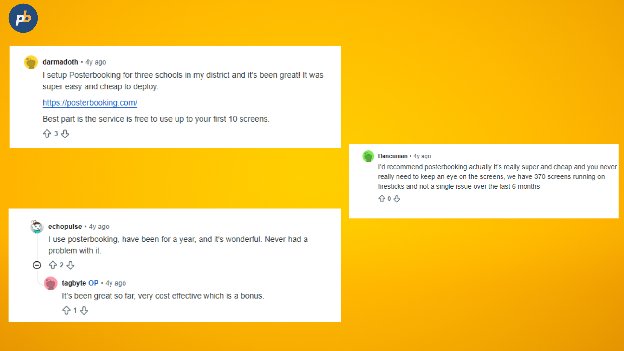
According to 2026 (Capterra) on PosterBooking reviews, PosterBooking held a 4.5/5 rating from 33 reviews in the available August 2026 snapshot. Positive comments commonly mention ease of use, remote changes, and accessible pricing.
In early 2026, few users objected to how the end of free access had been communicated, this has currently been fixed and our live pricing page and terms of condition now states the 3-month limit directly.
That gives you a simple planning rule. Put the free-period end date in your calendar when you activate your first screen. By the end of the trial, you should know whether the screens are useful enough to justify Home Basic or another plan.
How PosterBooking works day to day
You pair your screen, upload images or videos, create a playlist, and assign that playlist to the relevant display. You can then update the playlist from your browser instead of visiting the screen with a USB drive.
PosterBooking supports endpoints including:
- Amazon Signage Display
- Amazon Signage Stick
- Amazon Fire TV Stick
- Android TV
- Windows
- Raspberry Pi
- Chromebox
- Compatible web-based devices
Downloaded content can continue playing during a temporary internet interruption. Your new changes arrive when the player reconnects.
That sounds simple, and for a small network it should be. But you still need to separate 2 jobs:
- Managing the player or display
- Managing the content shown on that device
PosterBooking handles the content workflow. The player platform controls functions such as provisioning, system settings, updates, and device recovery.
PosterBooking and Amazon Signage Display
PosterBooking supports both the Amazon Signage Stick and the new Amazon Signage Display. This means you can use screens you already own or buy Amazon’s all-in-one 55-inch display without changing your PosterBooking content workflow.
According to 2026 (Amazon Signage) on CMS partners, PosterBooking is an official Amazon Signage CMS provider.According to 2026 (PosterBooking) on Amazon Signage Display specifications, the first model is a 55-inch 4K indoor display with Wi-Fi 6, Ethernet, Miracast, and an integrated system-on-chip player. Our documentation supports landscape presentation and portrait content through PosterBooking.
You still need to respect the hardware boundaries:
- Brightness is listed at 300 nits.
- Operation is rated for 18 hours per day, 7 days per week.
- The display is designed for indoor use.
- The launch model comes in one 55-inch size.
- United States availability limits immediate global deployment.
For an office, café, reception, gym, school, or indoor retail space, those limits may be perfectly acceptable. For a sunlit shop window, outdoor installation, or 24-hour control room, you need a more specialized commercial display.
The best part is the mixed-fleet option. You can use Amazon Signage Sticks on existing televisions and Amazon Signage Displays at new locations. Both groups can retain the same PosterBooking content process.
AbleSign is the closest alternative if free software is your main requirement. Its November 2026 fair-use policy describes an ongoing free service with limits of 2,000 screens per account and 250 screens per group.
AbleSign documents features including:
- Scheduling
- Offline playback
- Proof of play
- Screen zones
- User roles
- Multiple hardware platforms
According to 2026 (AbleSign) on its free signage service and 2026 (AbleSign) on fair-use limits, AbleSign uses a different commercial model from PosterBooking.
So why does PosterBooking still rank first? PosterBooking gives you a stronger route from a free test into an operating business network. You get:
- A guided 10-screen starting point
- Published paid plans
- A fixed-price unlimited-screen option
- Official Amazon Signage compatibility
- Enterprise multi-tenant controls
- AI content generation
- API access
AbleSign remains a relevant alternative. PosterBooking becomes the stronger choice when you expect your signage to develop into a managed network rather than remain a basic free installation.
What PosterBooking is building toward in 2027
PosterBooking’s focus in 2027 will move further into integrated hardware, AI-assisted content, and automated workflows.
There are four signals hinting at our direction for 2027. First, PosterBooking supports the Amazon Signage Stick. You can turn an existing screen into a purpose-built signage endpoint without relying on a consumer home screen.
Second, PosterBooking also supports the Amazon Signage Display. You can now deploy an all-in-one screen and player while keeping the same CMS workflow.
Third, earlier in 2026, PosterBooking introduced AI image generation inside the dashboard. You can create screen-oriented graphics without exporting every asset from a separate design application.
Fourth, our current pricing page describes API access for integrations, data synchronization, and automated workflows.
Those signals point toward 5 product priorities:
- AI-assisted content creation
- API-triggered content updates
- Faster Amazon Signage deployment
- Easier management of mixed Stick and Display fleets
- Stronger enterprise governance
What I like
- You can test up to 10 screens before paying for the software.
- You get a defined 10-screen price after the trial.
- Business Pro gives you fixed pricing for unlimited screens and locations.
- You can use both Amazon Signage hardware routes.
- AI image generation reduces content-production friction.
- API access creates a foundation for automated updates.
What users like
- Users frequently praise the setup process.
- Reviewers value making changes from a browser.
- Small organizations appreciate support for familiar hardware.
- Customers use PosterBooking across restaurants, offices, schools, and promotional displays.
- Offline caching protects existing content during temporary outages.
What I dislike
- The free offer currently ends after 3 months.
- Home Basic excludes screen monitoring and 4K content.
- Multi-tenant administration sits on Enterprise Plus.
- Older review sites still display outdated PosterBooking prices.
- The Amazon Signage Display currently has one size and one launch market.
What users dislike
- Several 2026 reviewers criticized the previous explanation of the free period.
- Users who expected permanent free access objected when their understanding differed.
- PosterBooking’s Capterra sample is smaller than the review bases available for Yodeck and OptiSigns.
Discussions within digital signage practitioner communities in 2025 repeatedly separate CMS usability from player maintenance. PosterBooking’s Amazon compatibility helps here because Amazon manages the device environment while PosterBooking manages your content.
Choose PosterBooking when you want to start several screens free, keep publishing simple, and retain a clear route into a larger network.
You should choose another platform when you need permanent zero-cost licensing or advanced enterprise controls inside the entry plan.
2. Yodeck: Best Popular All-Rounder
Yodeck is the best popular all-rounder when you want a broadly adopted signage platform without committing to one industry or display manufacturer. You get a free single-screen plan, templates, applications, schedules, layouts, offline playback, and an established Raspberry Pi option.

“Popular” does not mean Yodeck has the highest review count in every current snapshot. OptiSigns currently has more G2 reviews. Yodeck earns this category because it has become a familiar general-purpose choice across retail, restaurants, manufacturing, education, and offices.
According to 2026 (G2) on digital signage software reviews, Yodeck held a 4.7/5 rating from approximately 3,363 reviews in November 2026. That review volume gives you more evidence than a rating based on a few dozen users.
What Yodeck costs as you grow
Yodeck gives you one screen free while your account contains exactly one registered display. As of November 2026, Basic costs $8 per screen per month on annual billing. Premium costs $12, and Enterprise costs $16.
Here is the catch. Your free screen does not remain free after you add a second display.
According to 2026 (Yodeck) on its pricing model, every registered screen becomes billable when your account grows beyond one screen. A 5-screen Basic network therefore costs $40 per month rather than $32.
That creates 2 distinct buying cases:
- You run one screen and keep a permanent free Basic license.
- You run multiple screens and pay for every registered display.
If your office only needs one reception screen, Yodeck’s free account can be a sensible choice. If you already know you need 10 screens, PosterBooking gives you the stronger starting allowance and lower published 10-screen paid price.
What users discuss most
Yodeck users most often praise how quickly they can set up basic content and update it remotely. Tutorials, templates, and straightforward scheduling lower the initial learning barrier.
But that is not the feature users discuss most once the network becomes more complicated. G2 review summaries mention learning curves around advanced layouts, integrations, permissions, and paid plan boundaries.
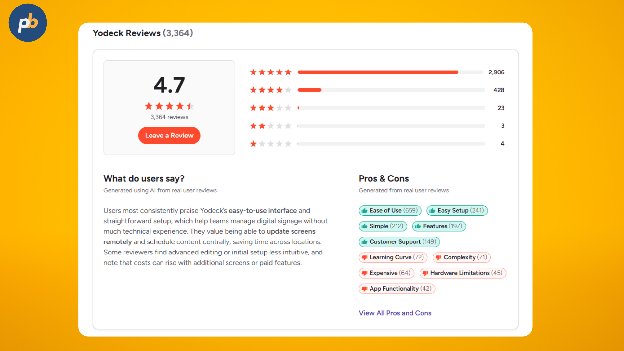
That pattern makes sense. Yodeck is broad enough to serve a one-screen café and a distributed company but the interface becomes more complex when you introduce workspaces, multiple contributors, dashboards, and local permissions.
OptiSigns is the closest broad-market alternative when you want more applications and interactive capabilities.
Yodeck is better suited to you when you value:
- A permanent free single screen
- A familiar Raspberry Pi route
- A mature general-purpose CMS
- Broad review evidence
- Conversational account administration
OptiSigns becomes the better choice when your screen needs to behave more like an application. That includes secured dashboards, touchscreen experiences, custom integrations, and interactive kiosks.
What Yodeck appears to be building toward in 2027
Yodeck’s 2026 releases suggest that you will manage more of your network through AI assistants and APIs during 2027.
According to 2026 (Yodeck) on its AI Agent, Premium and Enterprise customers can connect supported AI assistants to their accounts.
The current documentation covers actions involving:
- Screens
- Media
- Playlists
- Schedules
- Layouts
- Workspaces
- Users and roles
You could ask the connected assistant to identify offline screens, update a schedule, or push a playlist to a group of locations. Your existing Yodeck permissions still control what the assistant can change.
Yodeck introduced another signal in October 2026. According to 2026 (Yodeck) on Magic Layout, the feature turns a written prompt into 2 editable layout options.
Magic Layout does not automatically know your actual menu prices or event times. You still need to review the text and replace placeholder information.
The likely 2027 direction includes:
- AI-assisted layout creation
- Natural-language fleet management
- Bulk account administration
- Permission-aware AI actions
- Expanded API automation
- Easier management across mixed hardware
That direction is useful when you manage dozens of screens. If you only run one screen, the Basic publishing workflow may remain the only part you need.
What I like
- You can run one screen without a recurring software charge.
- Basic pricing remains easy to understand.
- You are not tied to one display manufacturer.
- You can choose Raspberry Pi, Amazon Signage, or another supported route.
- The AI Agent addresses repetitive management work.
What users like
- Users frequently praise the setup process.
- Reviewers value remote changes.
- Templates help non-designers publish useful content.
- The large review base covers different industries and company sizes.
- Offline playback protects downloaded content during a connection problem.
What I dislike
- Your free screen becomes billable after you add another display.
- Some growing networks will need Premium or Enterprise sooner than expected.
- Advanced configuration introduces a learning curve.
- The Amazon Signage Display does not reduce Yodeck’s per-screen license cost.
What users dislike
- Users report difficulty with advanced configurations.
- Some reviewers consider higher plans expensive.
- A portion of users mention integration limitations.
- Nontechnical teams can find complex layouts harder than the basic playlist workflow.
Discussions within multi-location digital signage communities in 2026 describe managers overwriting one another’s content and central teams losing visibility into local schedules. Yodeck gives you workspaces and roles, but you still need a rule for who controls each playlist.
Choose Yodeck when you want a popular general-purpose platform or need one permanent free screen.
You should choose something else when interaction, a large free multi-screen test, or fixed unlimited-screen pricing matters more.
3. OptiSigns: Best for Interactive Screens and Business Applications
OptiSigns is best when you want your displays to do more than rotate images and videos. You can use it for dashboards, business applications, social content, touchscreen experiences, and custom kiosk workflows.
As of November 2026, Standard currently costs $9 per screen per month when billed annually. Pro costs $11.25, Pro Plus costs $13.50, and Engage costs $27.
According to 2026 (OptiSigns) on digital signage pricing, Standard includes core scheduling, templates, a design tool, and more than 100 applications or integrations. Pro introduces stronger roles and proof of play. Pro Plus adds secured websites and business dashboards. You should match the plan to your actual screen job:
- A restaurant showing image-based menus may remain on Standard.
- An office showing an authenticated Power BI report may need Pro Plus.
- A touchscreen check-in experience may require Engage, OptiDev, or another add-on.
That is why the $9 entry price can be misleading. It is accurate, but it may not describe the version you need.
What users say most about OptiSigns
Users repeatedly praise how easily they can begin publishing while retaining room for more advanced use cases.
Users complain about OptiSigns’ unexpected subscription costs and hardware limitations, particularly when connecting multiple screens. Despite the Pro Player having three HDMI ports, users are required to purchase an additional Video Wall subscription for $25 per month to use multiple displays, even when they simply want to mirror the same content.
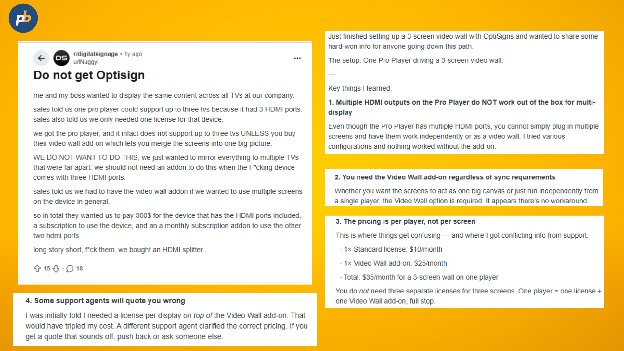
Some users also complain about OptiSigns’ unexpected subscription costs and hardware limitations, particularly when connecting multiple screens. Despite the Pro Player having three HDMI ports, users are required to purchase an additional Video Wall subscription for $25 per month to use multiple displays, even when they simply want to mirror the same content.
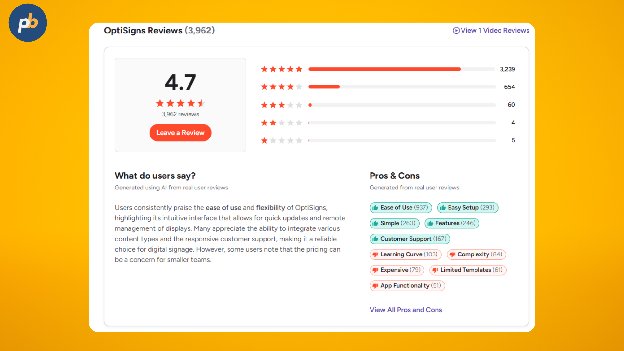
According to 2026 (G2) on OptiSigns reviews, OptiSigns held approximately 4.7/5 from more than 3,900 reviews in late 2026.
Positive review topics include:
- Ease of use
- Quick setup
- Remote management
- Templates
- Customer support
- Broad feature availability
Negative topics include:
- Learning curve
- Configuration complexity
- Price
- Template limitations
- Problems with individual applications
The pattern is reasonable. A simple playlist remains approachable. A secured dashboard or custom kiosk requires more decisions.
Remote management in everyday use
OptiSigns supports remote commands on compatible devices and higher plans. According to 2026 (OptiSigns) on remote device management, Pro Plus users can perform actions such as:
- Restarting supported players
- Taking screenshots
- Viewing compatible screens remotely
- Executing commands
- Updating supported players
You may not see every option on every device. Available controls depend on your plan, player, software version, and whether the device is online.
That last condition matters. You cannot send a cloud command to a device that has lost power. A remote-management feature reduces site visits, but it does not remove every physical failure.
Yodeck is the closer option when you need ordinary signage. OptiSigns is better when your screen needs applications, dashboards, or interaction.
Choose OptiSigns over Yodeck when you need:
- Interactive kiosk workflows
- A broad integration catalog
- Secured business dashboards
- AI-assisted application building
- Deeper remote commands
Choose Yodeck when you want a permanent free single screen, general templates, and a simpler all-round starting point.
What OptiSigns appears to be building toward in 2027
**OptiSigns appears to be developing into a combined CMS, kiosk, device, and no-code application platform.**According to 2026 (OptiSigns) on OptiDev, OptiDev uses an AI chat interface and visual editor to build interactive applications. OptiSigns demonstrated connections to Shopify, Stripe, BigQuery, and SharePoint.
You can now see 2 clearer hardware routes emerging:
- Use the Amazon Signage Display for passive content and dashboards.
- Use OptiKiosk or another touchscreen device for interactive applications.
That is a sensible split. Not every screen needs to be interactive, and interactive hardware costs more.
The likely 2027 focus includes:
- AI-generated screen applications
- Kiosk deployment
- Business-system integrations
- Remote device administration
- Integrated software and hardware packages
- Amazon Signage support for passive screens
You should still test anything generated with AI. A check-in application needs correct data validation, privacy controls, and a sensible failure state.
What I like
- You can begin with playlists and expand into applications.
- OptiSigns supports numerous content sources.
- Higher plans add stronger administrative controls.
- OptiDev reduces the development barrier for custom screen experiences.
- Amazon Signage gives you a simple all-in-one passive-display route.
What users like
- Reviewers consistently praise setup.
- Users value the integration range.
- Multi-location teams appreciate centralized updates.
- The large review base supports the recurring usability pattern.
- Users can work across several hardware environments.
What I dislike
- The entry price does not describe every interactive use case.
- Remote controls depend on your plan and player.
- The feature catalog makes requirement mapping harder.
- The Amazon Signage Display does not provide touchscreen input.
- AI-generated applications create another testing responsibility.
What users dislike
- Some reviewers encounter a learning curve.
- Individual applications do not always meet every user’s expectations.
- Costs increase as customers move into higher tiers.
- Some users want more templates or design freedom.
Discussions within digital signage content communities in 2025 repeatedly return to content relevance. More movement and more applications will not rescue an irrelevant message. You should define what you want the viewer to do before adding interaction.
Choose OptiSigns when dashboards, applications, and interactive experiences are central to your project.You should choose a simpler CMS when your entire requirement is an image or video playlist.
4. ScreenCloud: Best for Workplace Communications
ScreenCloud is better when you want to turn workplace content into a managed communication channel. You can bring announcements, dashboards, internal news, and employee updates onto screens without asking one person to rebuild every message manually.
This sounds ideal for a large company, but you should start with the size of your actual workplace. A small office may need one reception screen. In that case, ScreenCloud’s communication workflow may cost more than you need.
As of November 2026, ScreenCloud Studio Core starts at $20 per screen per month on annual billing. Pro has been listed at $30, while Enterprise pricing requires a quote.
According to 2026 (ScreenCloud) on current pricing, the company now offers Studio alongside ScreenCloud Arc. The 2 products come from ScreenCloud, but they do not have identical features.
When ScreenCloud makes sense for you
ScreenCloud becomes more compelling when you have 3 or more content contributors. For example, HR may publish employee news, operations may publish service updates, and facilities may manage building information.
Without a controlled workflow, those teams can overwrite one another or leave outdated content running. ScreenCloud’s value comes from organizing that contribution process.
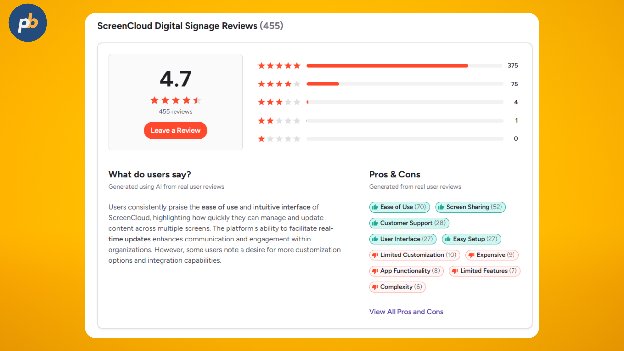
According to 2026 (G2) on ScreenCloud reviews, ScreenCloud held a 4.7/5 rating from approximately 455 reviews in late 2026.
Users commonly praise:
- Ease of use
- Screen sharing
- Customer support
- User interface
- Initial setup
Users commonly criticize:
- Price
- Limited customization
- Application functionality
- Missing features
- Advanced complexity
That feedback gives you a useful buying rule. ScreenCloud becomes easier to justify when the communication problem is expensive. If one person can update one screen in a few minutes, you may not need a $20 monthly license.
ScreenCloud Studio, Arc, and Amazon Signage Display
ScreenCloud Studio is the established CMS. ScreenCloud Arc launched in October 2026 as a newer enterprise product focused on connected feeds, faster publishing, device management, and communication measurement.
According to 2026 (ScreenCloud) on Arc’s launch features, Arc includes capabilities such as:
- Quick Post
- Automatic design
- Connected content feeds
- Power BI display
- Reach reporting
- Content classification
- AI feed transformation
AI feed transformation lets you apply written rules to source content. You could summarize an internal article, remove irrelevant sections, translate the text, and turn the result into screen content.
ScreenCloud appears within Amazon’s supported CMS ecosystem. That makes the Amazon Signage Display relevant when you are installing a new workplace screen.
You could use the combination for:
- Reception messages
- Employee recognition
- Operational dashboards
- Internal news
- Company announcements
- Power BI reports
The all-in-one display reduces the number of devices your IT team has to mount and power. Built-in Ethernet gives you a wired connection when company Wi-Fi policies make wireless signage inconvenient.
Still, you need to verify the exact ScreenCloud product. Amazon may support ScreenCloud as a CMS provider, but that does not mean every Studio feature already exists in Arc.
Closest alternatives: Yodeck and Appspace
Yodeck is the better alternative when you mainly want lower-cost publishing. Appspace is the closer alternative when your signage sits inside a larger workplace experience system.
Choose ScreenCloud when you want to:
- Reuse existing workplace content
- Give multiple departments controlled access
- Transform content into screen-ready posts
- Manage a distributed workplace screen network
- Measure communication activity
Choose Yodeck when you want to publish ordinary announcements and dashboards without paying for a broader communication workflow.
Appspace becomes relevant when your project includes desk booking, room scheduling, workplace applications, and employee experience. That broader scope may be useful, but it can require a larger implementation.
What ScreenCloud appears to be building toward in 2027
ScreenCloud’s clearest 2027 signal is Arc’s quarterly expansion.
Current development points toward:
- AI-assisted content transformation
- Content reuse from Teams, SharePoint, and intranets
- Automated design
- Communication measurement
- Remote device management
- Selected Studio capabilities moving into Arc
- Purpose-built hardware support
This direction creates an opportunity and a risk. You may gain a faster workplace publishing workflow, but the feature you rely on in Studio may not yet exist in Arc.
Before you choose, verify 3 details:
- Which ScreenCloud product contains your required feature?
- Which player supports that feature?
- What migration work would you face later?
Discussions within multi-location signage communities in 2026 describe central and local campaigns competing for the same screen time. ScreenCloud gives you permissions, but you still need to decide whose message takes priority.
What I like
- You can turn workplace content into a controlled screen channel.
- Arc reduces the manual design step.
- Connected feeds reduce repeated exports.
- ScreenCloud supports multiple contributors.
- Amazon Signage gives you an all-in-one hardware option.
- Arc provides a visible 2027 product direction.
What users like
- Users frequently praise the interface.
- Reviews support quick updates across locations.
- Customer support appears as a recurring strength.
- Teams value integrations with familiar workplace content.
- Nontechnical contributors can manage routine messages.
What I dislike
- Core costs $200 per month for 10 screens before hardware.
- Arc and Studio create another decision.
- Reach calculations do not automatically prove human attention.
- Enterprise controls require contract review.
- A small office may not use enough of the workflow to justify the price.
What users dislike
- Some customers find ScreenCloud expensive at scale.
- Reviewers request more customization.
- Application limitations appear in some reviews.
- Advanced configurations introduce complexity after the easy initial setup.
Choose ScreenCloud when multiple teams need to publish and reuse workplace content across several screens. You should choose a lower-cost CMS when one person manages one or 2 simple office displays.
5. Rise Vision: Best for Schools and Education
Rise Vision is best when your school wants one system for announcements, screen sharing, and emergency messages. You can use the same display estate for daily communication and higher-priority alerts.
As of November 2026, School Basic starts at $119 per display per year. Advanced adds emergency-alert capabilities and other school-oriented functions. Enterprise and Unlimited arrangements add stronger administrative controls.
According to 2026 (Rise Vision) on school pricing, an Unlimited license is sold per school. A district with 3 participating schools therefore needs 3 Unlimited licenses.
This is where you need to slow down and calculate the actual estate. Per-display pricing works differently from per-school pricing when classroom panels, office screens, and common-area displays all become endpoints.
Why schools choose Rise Vision
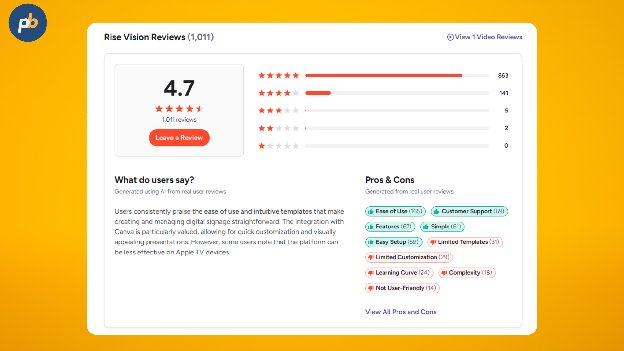
Rise Vision’s strongest review theme is approachable content creation for education. According to 2026 (G2) on Rise Vision reviews, the platform held approximately 4.7/5 from more than 1,000 reviews in late 2026.
Users commonly value:
- School-oriented templates
- Customer support
- Centralized publishing
- Ease of use
- Integrations with familiar design tools
The harder part appears when you introduce emergency communication. Your normal playlist, safety-alert source, player, and display all need to work together.
You should test the complete path. Send a test alert, confirm that it overrides the scheduled content, and verify that the normal playlist returns afterward.
Closest alternative: Yodeck
Yodeck is the better alternative when you only need ordinary school announcements.
Rise Vision becomes more valuable when you need:
- School-specific templates
- Emergency overrides
- Screen sharing
- District-oriented scheduling
- Classroom and common-area communication
- Education-focused support
If you manage one lobby screen, Yodeck’s free single-screen plan may be enough. If the screens participate in school communication and safety, Rise Vision gives you a more relevant operating model.
What Rise Vision appears to be building toward in 2027
Rise Vision’s current releases suggest that 2027 development will continue around consolidated school communications and managed hardware.
According to 2026 (Rise Vision) on digital signage trends, active areas include:
- AI-assisted presentation design
- Integrated emergency alerts
- Interactive displays
- Screen sharing
- Real-time information feeds
Amazon Signage support adds another signal. Rise Vision is moving further toward purpose-built player management rather than relying entirely on consumer streaming devices.
For you, that means the hardware decision becomes part of the software decision. A low-cost consumer player may save money today, but you need to consider its update life, remote-management options, and replacement cycle.
What I like
- You can manage routine and urgent school communication in one environment.
- Templates reduce repetitive design work.
- Emergency overrides receive proper attention.
- Screen sharing increases the usefulness of classroom displays.
- Amazon Signage provides a cleaner installation option.
- Education-oriented support reduces implementation friction.
What users like
- School users value the templates.
- Reviews frequently praise support.
- Users appreciate centralized updates.
- Canva and other content sources reduce design work.
- Offline playback protects routine content.
What I dislike
- Basic pricing does not describe a complete emergency-notification deployment.
- Unlimited licensing is sold per school.
- Interactive licenses add considerable cost.
- Mixed hardware still needs testing.
- The Amazon Signage Display will not suit every classroom.
What users dislike
- Some reviewers encounter editing limitations.
- Advanced scheduling takes time to understand.
- Template quality varies by content requirement.
- Larger school deployments need planning beyond the initial setup.
Discussions within digital signage content-service communities in 2026 separate the software from the labor required to maintain content.
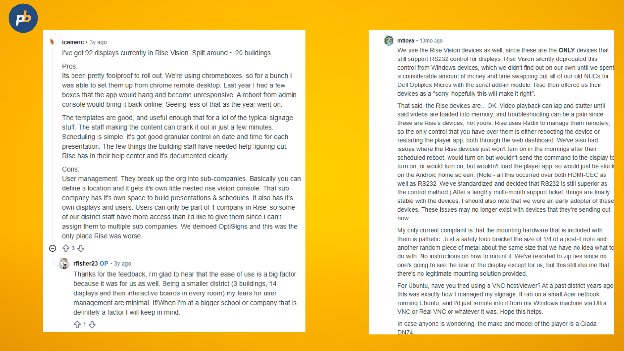
Your school can receive hundreds of templates, but someone still needs to update dates and remove expired announcements.
Choose Rise Vision when your displays support school communication, teaching, and emergency messages.
You should choose a simpler CMS when you need one low-risk announcement screen.
6. Xibo: Best for Self-Hosting and Infrastructure Control
Xibo is best when you want to run the signage CMS on infrastructure you control. You can use its open-source Community Edition or pay for commercial hosting, players, and support.
According to 2026 (Xibo) on its open-source CMS, Community Edition users become responsible for:
- Server maintenance
- Database operation
- Security
- Backups
- Updates
- Incident response
That is the part people often miss. Free software does not mean the system operates itself.
If your organization already has infrastructure staff, self-hosting may fit naturally. If nobody owns the server, you may spend more in staff time than you save in licensing.
Xibo pricing and deployment options
As of November 2026, Xibo’s cloud Professional plan starts at $4.90 per display per month when billed annually. Business costs $7.70, and Enterprise costs $12.60.
According to 2026 (Xibo) on cloud and self-hosted pricing, Professional includes hosting and help-desk support. Higher tiers add stronger bandwidth, SAML support, reporting retention, and support levels.
You have 3 main routes:
- Run Community Edition and support it yourself.
- Use Xibo Pro in a supported self-hosted environment.
- Use Xibo Cloud and let Xibo manage the infrastructure.
You should self-host because you need control, not simply because the CMS license is free.
What users like and where they struggle
Xibo users often value flexibility and control. The recurring complaint is complexity. You may find layouts and configuration less immediate than in a simple cloud signage tool. That extra work comes from the number of decisions Xibo gives you.
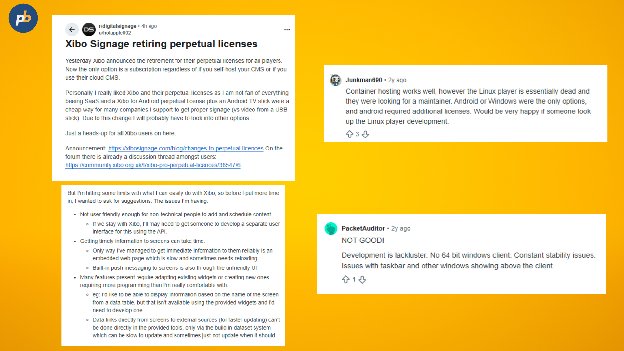
The platform suits a technical team that wants those decisions. It may frustrate a restaurant manager who only wants to change a menu image.
Closest alternative: PosterBooking
PosterBooking is the better alternative when you want low-cost deployment without running a CMS server.
Choose Xibo when you need:
- A self-hosted CMS
- An open-source core
- More infrastructure control
- Technical integrations
- Flexible player options
Choose PosterBooking when you want the vendor to operate the cloud application and your team to focus on content. You can test up to 10 screens without provisioning a server.
What Xibo is moving toward in 2027
Xibo has the clearest dated 2027 transition in this comparison. According to 2026 (Xibo) on its perpetual-license transition, new legacy perpetual player licenses will no longer be available after May 31, 2027. Support and security updates for affected legacy products will also end under the published transition.
Xibo Community Edition will continue. The change affects legacy commercial player licensing and the movement toward Xibo Pro subscriptions.
If you already use Xibo, inventory:
- Player operating system
- License type
- CMS version
- Security-update status
- Replacement plan
You should finish that review before the May 2027 deadline rather than waiting for a screen-expansion project.
What I like
- You can control where the CMS runs.
- Community Edition gives you an open-source starting point.
- Cloud plans provide a managed alternative.
- Published cloud pricing remains competitive.
- Xibo has documented its 2027 transition clearly.
What users like
- Technical users value the flexibility.
- Organizations appreciate the hosting choice.
- Xibo supports advanced layouts and scheduling.
- The open-source community provides another support channel.
What I dislike
- Self-hosting transfers substantial work to you.
- The licensing transition creates migration work.
- Layout and server configuration can overwhelm small teams.
- Commercial players complicate the idea that Xibo is entirely free.
- Amazon Signage Display compatibility requires separate verification.
What users dislike
- Reviewers report a learning curve.
- Some users find layouts confusing.
- Hardware and version differences make troubleshooting harder.
- Self-hosted users cannot assume commercial support.
Discussions within digital signage infrastructure communities in 2025 emphasize that support and firmware responsibilities determine whether a signage service remains manageable. Xibo works when someone on your team owns those responsibilities.
Choose Xibo when you have technical staff and need infrastructure control.You should avoid self-hosting when nobody has been assigned to maintain the system.
7. TelemetryTV: Best for Live Dashboards and Developer-Led Networks
TelemetryTV is best when your screens need to display live data, dashboards, and application content. It combines traditional playlists with APIs, secured web content, permissions, alerts, and technical fleet controls.
As of November 2026, the Entry starts at $8 per device per month on annual billing. Core costs $13, while Elite costs $16 with a 10-device minimum.
According to 2026 (TelemetryTV) on digital signage pricing, Entry includes scheduling, applications, media storage, and zones. Core adds:
- Group permissions
- User activity logs
- Automatic provisioning
- Programmatic API access
- Secured web screenshots
- Tag-based management
Elite adds proof of play, device logs, media expiration, and stronger support.
When TelemetryTV makes sense for you
TelemetryTV becomes relevant when the data is the content.
You might use it to display:
- Call-center queue data
- Production figures
- Logistics measures
- Sales dashboards
- Service status
- Operational alerts
The difficult part is not placing a chart on a screen. The difficult part is deciding what appears when the chart fails.
You need to define:
- Fallback content
- Authentication renewal
- Refresh intervals
- Ownership of incorrect data
- Privacy restrictions
- Diagnosis of outdated content
The CMS can display the information, but your team remains responsible for its accuracy and security.
What users like and dislike
According to 2026 (G2) on TelemetryOS reviews, the related listing held approximately 4.8/5 from 102 reviews in the available snapshot.
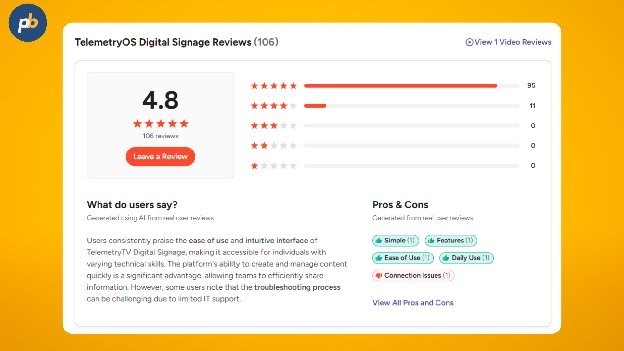
Users commonly value:
- Real-time updates
- Flexible layouts
- Data visualization
- Centralized scheduling
- Broad content options
Negative feedback includes:
- Connection problems
- Difficulty reaching human support on lower plans
- Complex permission setup
- Hardware troubleshooting
That feedback is useful because live data adds more points of failure than an image playlist.
Closest alternative: OptiSigns
OptiSigns is better when you want dashboards alongside a larger application catalog. TelemetryTV is better when developers or data teams own the screen network.
Choose TelemetryTV when you need:
- APIs
- Metrics
- Screen applications
- Data-led workflows
- Technical administration
- Controlled device behavior
Choose OptiSigns when a marketing or operations team wants easier access to ready-made applications and interactive tools.
What TelemetryTV is moving toward in 2027
TelemetryTV is evolving toward TelemetryOS, a more vertically integrated screen-application platform.
According to 2026 (TelemetryOS) on hardware architecture, the newer platform narrows hardware support so the vendor can control the player, operating system, runtime, updates, and cloud-management layer.
You get a trade-off:
- Broad compatibility gives you more player choice.
- Controlled hardware gives the vendor more authority over startup, recovery, updates, and peripherals.
ChromeOS adds another 2027 issue. TelemetryOS documentation identifies April 2027 as the end of long-term kiosk support for legacy Chrome applications.
If you use Chrome-based signage, check the actual player technology. A Chrome application, progressive web application, and Android player can follow different support paths.
The likely product direction includes:
- Edge applications
- Local data processing
- Fleet-wide deployment
- Peripheral support
- Controlled hardware
- Deeper device telemetry
You should review migration and hardware requirements before treating TelemetryTV and TelemetryOS as the same deployment.
What I like
- You can treat screens as managed data endpoints.
- Core exposes APIs and stronger administration.
- Elite separates proof-of-play requirements.
- TelemetryOS provides a visible technical direction.
- The platform suits teams that already manage data infrastructure.
What users like
- Reviewers value real-time updates.
- Users appreciate flexible layouts.
- Centralized control suits distributed networks.
- The platform supports more than marketing slides.
What I dislike
- Phone support sits on enterprise or custom plans.
- Advanced reporting requires higher tiers.
- The platform transition creates a hardware decision.
- Dashboards introduce authentication and privacy work.
- Amazon Signage Display support was not used as evidence for this recommendation.
What users dislike
- Some users report connection issues.
- Reviewers mention difficulty reaching human support.
- Roles and permissions take time to configure.
- Mixed hardware adds troubleshooting variables.
Choose TelemetryTV when developers or data teams need to manage live information across screens.
You should choose a simpler platform when your content consists of scheduled images and videos.
8. Samsung VXT: Best for Samsung Commercial Display Fleets
Samsung VXT is best when you want to standardize your signage network around supported Samsung commercial displays. You can manage content and supported display functions inside the same ecosystem.
According to 2026 (Samsung VXT) on plans and pricing, VXT uses quote-based S, P, and X series plans. Some applications require separate purchases.
The plan structure progresses through 3 levels:
- S Series covers content, playlists, scheduling, and enrollment.
- P Series adds synchronized playback and advanced tagging.
- X Series adds proactive monitoring and higher support capabilities.
VXT remote-management plans separately cover power, display settings, security, energy use, and early warnings.
When VXT makes sense for you
VXT becomes more useful as your Samsung display fleet grows. You may want to apply the same settings across locations, check which screens are online, monitor energy use, or recover a failed display remotely.
A small business with one ordinary Samsung television may not need that control. A retailer operating 500 supported commercial panels has a different problem.
You should verify the exact model before buying. A Samsung consumer television does not automatically support the same VXT functions as a commercial display.
What users say about Samsung VXT
According to 2026 (G2) on Samsung VXT reviews, VXT held a 4.6/5 rating from 55 reviews in the available snapshot.
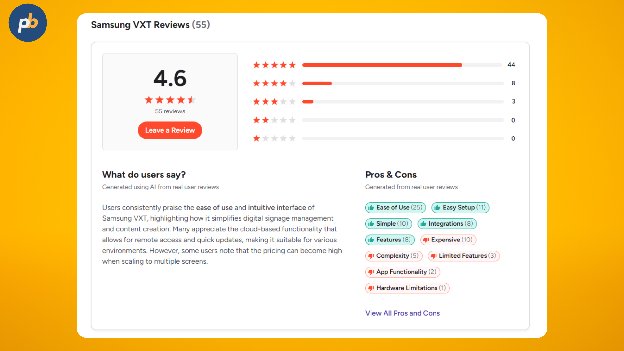
Users commonly value:
- Intuitive setup
- Remote scheduling
- Display coordination
- Samsung integration
Negative themes include:
- Feature limitations
- Cost concerns
- Model-specific compatibility
- Scaling expenses
The 55-review sample is smaller than the Yodeck or OptiSigns evidence bases. You should therefore give your own model-specific pilot more weight.
Amazon Signage Display as the closest alternative
The Amazon Signage Display paired with PosterBooking is the better all-in-one alternative when you do not need Samsung VXT’s enterprise display controls.
Both routes can give you a screen with an internal player, but they address different operating requirements:
| Attribute | Amazon Signage Display with PosterBooking | Samsung VXT with supported displays |
|---|---|---|
| Display range | One 55-inch launch model | Indoor, outdoor, LED, e-paper, and specialized models |
| CMS choice | PosterBooking and other Amazon CMS partners | Samsung VXT ecosystem |
| Operating profile | Indoor 18/7 | Model-dependent, including 24/7 options |
| Brightness | 300 nits | Varies by model and environment |
| Device management | Amazon Signage Manager | VXT monitoring, presets, energy controls, and early warnings |
| Best fit | Small or mid-sized indoor installations | Standardized enterprise display fleets |
Choose the Amazon Signage Display with PosterBooking when you want:
- A simpler indoor installation
- An integrated player
- A published hardware price
- Freedom to choose an Amazon-compatible CMS
- A straightforward path for offices, schools, and restaurants
Choose Samsung VXT when you need:
- Outdoor commercial displays
- Higher-brightness screens
- 24-hour operation
- Energy monitoring
- Proactive failure alerts
- Firmware administration
- Large video walls
- Enterprise display presets
This is where the difference becomes obvious. Samsung VXT is not simply another all-in-one display option. It is a commercial display-management environment.
What Samsung appears to be building toward in 2027
Samsung’s 2026 updates point toward deeper fleet monitoring, automated recovery, event-triggered content, and tighter hardware integration.
According to 2026 (Samsung VXT) on fleet-management updates, VXT introduced or expanded:
- Multi-screen live view
- Role-specific home pages
- Content approval
- Version history
- API-key management
- Remote controls
- LED cabinet status
- Custom screen-wall layouts
According to 2026 (Samsung) on VXT content-management updates, Samsung added weather-triggered content, synchronized takeovers, live streaming, AI Studio, and Smart Download on compatible systems.
The likely 2027 direction includes:
- Automated device recovery
- Multi-screen live verification
- Event-triggered content
- Energy reporting
- AI-assisted media creation
- Granular approval workflows
You should not assume that every feature works on every Samsung display. Availability depends on your model, Tizen version, region, plan, and purchased applications.
What I like
- You can manage content and supported display operations together.
- Zero-touch configuration can reduce site work.
- Live View helps you verify what is playing.
- Approval and version controls strengthen governance.
- Samsung supports operating conditions beyond the Amazon launch display.
- The 2026 updates provide a clear enterprise direction.
What users like
- Reviewers appreciate intuitive setup.
- Users value remote scheduling.
- Samsung customers benefit from integrated hardware and software.
- Central administration reduces configuration differences.
What I dislike
- You need a sales conversation to establish pricing.
- Applications can cost extra.
- Compatibility remains model-specific.
- A Samsung-centered architecture increases dependence on one ecosystem.
- The platform is excessive for one ordinary indoor screen.
What users dislike
- Some reviewers want more functionality.
- Cost becomes a concern across larger fleets.
- The smaller review base provides less evidence.
- Buyers can overestimate compatibility when they check only the brand.
Choose Samsung VXT when supported Samsung commercial displays form the backbone of your network.
You should choose the Amazon Signage Display with PosterBooking when you want a simpler indoor all-in-one setup without Samsung’s enterprise fleet requirements.
Hardware and Digital Signage Trends That Matter in 2027
The Amazon Signage Display makes affordable all-in-one signage hardware one of the biggest 2027 developments. You can now buy a 55-inch 4K display and media player as one product.
According to 2026 (Amazon) on the Signage Display, the Display uses the same Amazon portal and application as the Signage Stick. This means you can operate a mixed Amazon hardware fleet without learning 2 device-management systems.Your hardware choice becomes easier:
- Use the Signage Stick when you already own a suitable screen.
- Use the Signage Display when you need a new 55-inch indoor screen.
You should not replace working displays merely because an all-in-one product exists. The mixed model lets you keep older screens and standardize new installations gradually.
How to Choose Digital Signage Software for 2027
Choose your software by matching it to the hardest recurring task in your screen operation.
Use this 7-step process:
- Define what the screen does. Decide whether you need promotions, menus, dashboards, announcements, alerts, wayfinding, or applications.
- Count locations. Multiple locations create more permission and support problems than multiple screens in one room.
- Separate existing and new screens. Existing screens may need a Stick, while new locations may justify an all-in-one display.
- Choose the hardware class. Compare consumer players, purpose-built sticks, commercial players, and internal system-on-chip displays.
- Map the users. Name who creates, approves, schedules, and removes content.
- Calculate the 3-year cost. Include plan upgrades, hardware replacement, staff time, and support.
- Test a failure. Disconnect the player, expire a campaign, change a schedule, and attempt remote recovery.
That final step tells you more than a polished demo. A demo shows you what happens when everything works. A failure test shows you whether your team can keep the network running.
Final Buyer Guidance
Choose PosterBooking when you want to launch several screens free and retain a clear route to fixed-price growth. PosterBooking becomes more relevant in 2027 because you can use both Amazon Signage hardware routes. Add a Stick to an existing screen or deploy the new all-in-one Display without changing your content workflow.
Choose Yodeck when you want a popular general-purpose platform or one permanent free screen. Yodeck suits ordinary menus, announcements, and promotional content.
Choose OptiSigns when your displays need dashboards, applications, or interaction. Use the Amazon Signage Display for passive content and suitable touchscreen hardware for interactive projects.
Choose ScreenCloud when multiple teams need to turn existing workplace content into screen communication. A small office with one simple screen may not need the additional workflow or cost.
Choose Rise Vision when your school combines announcements, screen sharing, and emergency messages. Amazon’s all-in-one Display can simplify hardware in larger common areas.
Choose Xibo when you need self-hosting and already have the technical resources to operate it. Existing perpetual-license customers should plan around the May 31, 2027 deadline.
Choose TelemetryTV when developers or data teams own the screens. Its dashboard and API direction becomes more valuable when live information is the content.
Choose Samsung VXT when supported Samsung commercial displays form the backbone of your network. Samsung becomes more useful when you need outdoor screens, 24-hour operation, energy controls, or enterprise fleet monitoring.
Your best option depends on what you need today and what will become difficult as the network grows. Choose the platform your team can still manage after the installer leaves.
Frequently Asked Questions
What is the best digital signage software for 2027?
PosterBooking is the best option when you want a free multi-screen start and a fixed-price path to growth. Yodeck is the stronger general-purpose alternative when you need one permanent free screen.
Is PosterBooking free in 2027?
PosterBooking currently gives new customers up to 10 screens free for 3 months. Home Basic then costs $54 per month for 10 screens under pricing checked on November 24, 2026.
Is AbleSign an alternative to PosterBooking?
Yes, AbleSign is another free option, but PosterBooking gives you a stronger route from a 10-screen test into paid business and enterprise operation. PosterBooking adds official Amazon Signage support, AI content creation, API access, and fixed-price growth.
Why is PosterBooking ranked above Yodeck?
PosterBooking gives you a broader free multi-screen starting period and a lower published 10-screen paid cost. Yodeck gives you one permanent free screen and a larger independent review base.
What is the Amazon Signage Display?
The Amazon Signage Display is a 55-inch 4K indoor signage screen with a built-in media player. Amazon launched the first model in the United States on October 15, 2026.
Does PosterBooking work on the Amazon Signage Display?
Yes. You select PosterBooking during Amazon Signage setup and then manage your media, playlists, schedules, and screen assignments through PosterBooking.
Is the Amazon Signage Display better than the Amazon Signage Stick?
The Display is better when you need a new 55-inch screen, while the Stick is better when you already own a suitable display. Both use the Amazon Signage management environment.
Can you use Yodeck, OptiSigns, ScreenCloud, or Rise Vision on the Amazon Signage Display?
Amazon lists PosterBooking, Yodeck, OptiSigns, ScreenCloud, and Rise Vision within its CMS partner ecosystem. You still need to confirm which software plan contains your required features.
Can you use the Amazon Signage Display outdoors?
No. The launch model is designed for indoor use and is not rated for direct sunlight.
Can the Amazon Signage Display run continuously?
The launch model is rated for 18 hours per day, 7 days per week rather than continuous 24-hour operation.
Does the Amazon Signage Display include free CMS software?
No. Amazon supplies the display and device environment, while you select a separate compatible CMS. PosterBooking provides a free 10-screen starting period for new customers.
Which platform is best for one screen?
Yodeck is the strongest option when you want one permanent free screen. PosterBooking becomes more compelling when you want to test several screens.
Which platform is best for 5-10 screens?
PosterBooking is the best 10-screen starting option. You can test up to 10 displays free for 3 months and then move to Home Basic at $54 per month.
Which platform is best for interactive kiosks?
OptiSigns is the strongest interactive-kiosk option in this ranking. You still need compatible touchscreen hardware because the Amazon Signage Display is not positioned as a touchscreen.
Which platform is best for workplace screens?
ScreenCloud is best when multiple teams need to publish workplace content. Yodeck or PosterBooking may offer better value when one person manages one or 2 basic office screens.
Which platform is best for schools?
Rise Vision is best when your school uses displays for announcements, screen sharing, and emergency messages. Yodeck remains a lower-cost alternative for ordinary announcements.
Which platform supports self-hosting?
Xibo provides the strongest self-hosted option in this ranking. You will need technical staff to maintain the server, database, backups, security, and updates.
Which platform is best for live dashboards?
TelemetryTV is best when developers or data teams manage the screens. OptiSigns is the stronger alternative when you want dashboards alongside a broader application catalog.
Should you use a Fire TV Stick for digital signage in 2027?
A Fire TV Stick can support a small, noncritical screen, but a purpose-built signage device such as Amazon Signage Stick or Amazon signage display gives you stronger startup, provisioning, and fleet-management controls.
What should you test before buying digital signage software?
Test your exact player, content type, network, permissions, offline behavior, and recovery process. Disconnect the player, expire a campaign, change a schedule, and see whether your team can recover the screen remotely.