
PosterBooking is the best-value choice if you need to publish routine messages across a large network of screens at one fixed software price. ScreenCloud is best if several teams need governed publishing across mixed hardware. Appspace is best if your signs must connect to desk booking and workplace services. Korbyt is best if you need to reach employees on signs, desktops, and mobile devices. Skykit is best if your IT team owns player management. 22Miles is best for interactive campus wayfinding. TelemetryTV is best for operational dashboards. Samsung VXT is best if your fleet uses Samsung commercial displays.
Your hardest signage problems may appear after the screens are installed. A branch manager changes a local notice and accidentally removes a corporate message. A dashboard still looks current even though it stopped refreshing yesterday. A player reports that it is online while the television is asleep. An employee leaves, but their publishing account remains active.
Those failures have different causes. You need to know whether a platform manages content, people, data, hardware, or all four before you compare prices.
I analysed vendor documentation, public pricing, named deployments, review data, and practitioner discussions available through October 12, 2026. I did not conduct hands-on tests. You should treat published prices as starting points, vendor case studies as first-party accounts, and individual reviews as questions for your own pilot.
Table Of Contents
- How I Evaluated the Best Enterprise Digital Signage
- Published Pricing at a Glance
- Best Enterprise Digital Signage in 2026
- 1. PosterBooking: Best Value for Distributed Enterprise Announcements
- What I like
- What users like
- What I dislike
- What users dislike
- 2. ScreenCloud: Best for Governed Internal Communications on Mixed Hardware
- What I like
- What users like
- What I dislike
- What users dislike
- 3. Appspace: Best for Signage Connected to Workplace Operations
- What I like
- What users like
- What I dislike
- What users dislike
- 4. Korbyt: Best for Employee Communications Across Screens, Desktop, and Mobile
- What I like
- What users like
- What I dislike
- What users dislike
- 5. Skykit: Best for IT-Owned Player Fleets
- What I like
- What users like
- What I dislike
- What users dislike
- 6. 22Miles: Best for Interactive Campus Wayfinding
- What I like
- What users like
- What I dislike
- What users dislike
- 7. TelemetryTV: Best for Protected Operational Dashboards
- What I like
- What users like
- What I dislike
- What users dislike
- 8. Samsung VXT: Best for Samsung Commercial Display Fleets
- What I like
- What users like
- What I dislike
- What users dislike
- Hardware & Technology Trends
- Your players are IT endpoints
- You should test network enrollment first
- You should distinguish cached playback from fresh information
- Your AI evaluation should begin with a task
- Integrations & Features
- Which integration matters most?
- Who should control local and corporate content?
- How should an emergency override work?
- Are SSO, permissions, provisioning, and auditing interchangeable?
- Cost & Operational Insights
- What could the software cost at 100 or 200 screens?
- What should your three-year budget include?
- What should your pilot prove?
- Final Buyer Guidance
- Frequently Asked Questions
- What is enterprise digital signage?
- Which platform is best overall?
- Can PosterBooking manage more than ten screens?
- Can you use a regular television?
- Will your screens work during an internet outage?
- Can you show Power BI or Tableau?
- Do you need SSO for every deployment?
- Should you replace the CMS when a screen goes black?
- Evaluate PosterBooking Before Your Rollout
How I Evaluated the Best Enterprise Digital Signage
This ranking begins with a common enterprise need: you want one team to distribute accurate content across departments or locations. It then considers what happens when you add more editors, sensitive data, specialist displays, or remote sites.
| Evaluation criterion | Weight | What it means for you |
|---|---|---|
| Enterprise workflow fit | 25% | The platform should solve a clear problem across teams or locations |
| Governance and security | 20% | You should be able to control, remove, and audit publishing access |
| Fleet operation | 20% | Your team should be able to identify failures and act remotely where supported |
| Three-year cost | 15% | You should account for software, hardware, implementation, and staff time |
| Integrations | 10% | Your screens should receive information from the system that owns it |
| Usability and evidence | 10% | Your intended editors should be able to use it, with credible evidence of buyer fit |
The numbered order is not a universal feature score. PosterBooking leads for a cost-sensitive announcement network. If SAML single sign-on is mandatory for your deployment, ScreenCloud’s Enterprise tier may be a better fit. If visitors need interactive routes across your campus, you may put 22Miles first.
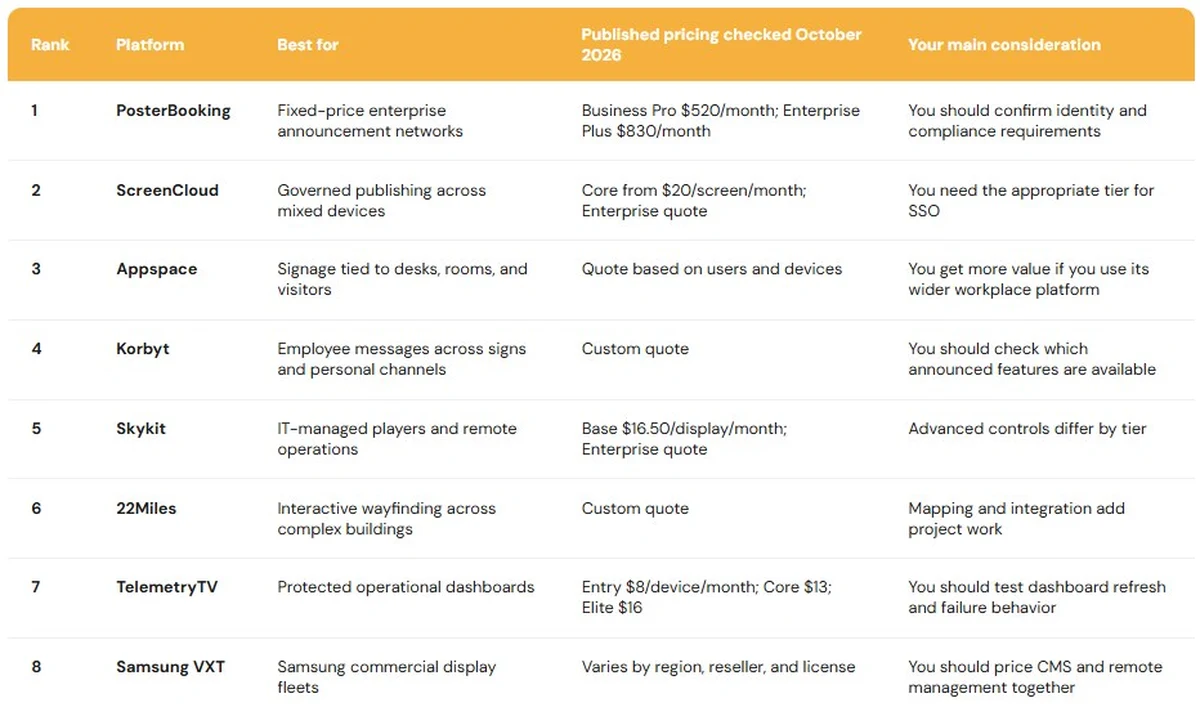
These prices are not equivalent enterprise packages. Your final cost will also depend on hardware, tax, implementation, support, and the features included in your contracted tier.
Published Pricing at a Glance
| Platform | Published pricing | Enterprise pricing considerations |
|---|---|---|
| PosterBooking | Home Basic: $52/month for ten screens; Business Pro: $520/month; Enterprise Plus: $830/month | Business Pro and Enterprise Plus list unlimited screens and locations; Enterprise Plus adds the listed security, reporting and support features |
| ScreenCloud | Core: $20/screen/month; Pro: $30/screen/month | Enterprise requires a quote; do not treat Core pricing as an SSO deployment |
| Appspace | Quote based on users and devices | Include signs, room panels, kiosks and employees using reservations |
| Korbyt | Quote-based | Request an itemized scope for signs, desktop, mobile, space services and implementation |
| Skykit | Base: $16.50/display/month | Enterprise requires a quote; advanced controls may be add-ons |
| 22Miles | No price supplied in this comparison | Scope mapping, design, accessibility, integrations and ongoing location updates |
| TelemetryTV | Entry: $8/device/month; Core: $13; Elite: $16 | Elite has an annual term and a ten-device minimum; select the tier with your required controls |
| Samsung VXT | European reseller CMS S: €99/screen/year; CMS P: €299; remote management: €75 or €140 separately | Regional reseller figures, not a universal Samsung enterprise quote; include both licenses and supported displays |
Best Enterprise Digital Signage in 2026
1. PosterBooking: Best Value for Distributed Enterprise Announcements
PosterBooking is a cloud signage platform that lets you upload images and videos, create playlists, schedule content, and assign it to screens across locations. It fits you best when many displays show relatively straightforward messages: branch announcements, lobby information, staff notices, campaigns, and local updates.
Suppose you have three screens in each of 80 branches. Headquarters needs to publish a campaign everywhere, while local staff need to change opening hours and visitor instructions. Your software costs can rise quickly if you pay a full per-screen fee for every display. PosterBooking’s fixed-price plans change that calculation.
According to a 2026 (PosterBooking) on digital signage pricing, Business Pro costs $520 per month and lists unlimited screens and locations. Enterprise Plus costs $830 per month, also lists unlimited screens, and adds two-factor authentication, user audit history, multi-tenant accounts, play-out reporting, a dedicated server, and 24/7 support. Home Basic includes ten screens for $52 monthly. The ten-screen bundle is a pricing point, not the capacity limit of Business Pro or Enterprise Plus.
At 100 screens, the published Business Pro fee works out to $5.20 per screen per month. At 200 screens, it becomes $2.60. At 500 screens, it is $1.04. Those figures divide the fixed monthly fee by your screen count. They exclude players, displays, installation, and tax. They also do not mean that every PosterBooking tier includes the same security and integration features as a competitor’s enterprise package.
PosterBooking’s enterprise page describes large deployments and an offer of ten Amazon Signage Sticks with a qualifying annual Enterprise Plus subscription. According to a 2026 (PosterBooking) on enterprise deployments and hardware, the offer depends on its stated subscription and geographic conditions. You should get the applicable terms in writing before using the hardware offer in your budget.
The clearest favorable user theme is ease of setup for ordinary screens. Available reviews describe relatively quick setup and playlist changes on Android and Amazon devices. A 2026 (Capterra) listing of PosterBooking pricing and reviews showed 4.5 out of 5 from 33 reviews. That modest sample gives you a reason to test the editor with branch staff.
What I like
Your software fee becomes predictable as a simple network grows. Enterprise Plus also lists audit history and multi-tenant accounts, which are more relevant to a distributed operation than the introductory ten-screen offer.
What users like
Favorable reviews describe fast setup and uncomplicated remote updates. You may find that valuable if branch staff, rather than AV specialists, will keep notices current.
What I dislike
PosterBooking needs to make its enterprise capabilities and use cases more explicit and prominent. Its Enterprise Plus plan already lists enterprise features:
- Unlimited screens and locations.
- Encrypted accounts and two-factor authentication.
- User audit history.
- Multi-tenant franchise accounts.
- A dedicated server.
- 24/7 support.
- Play-out impression reporting.
You should be able to see more clearly how they support enterprise deployments, with practical examples and more detailed documentation to help your procurement team assess the platform.
What users dislike
Earlier Trustpilot reviews report confusion about free-tier expiry and the requirement to upgrade. Those reviews describe users’ experiences under earlier messaging, however PosterBooking’s current terms and conditions now explicitly state that the first 10 screens are free for three months from registration for new customers.
You should choose PosterBooking if you want to manage screens across multiple locations at a fixed software subscription cost. Its unlimited-screen plans support that use case. You should confirm any mandatory enterprise requirements with PosterBooking before committing to a wider rollout.
2. ScreenCloud: Best for Governed Internal Communications on Mixed Hardware
ScreenCloud is a cloud CMS for organizations where several teams need to publish content while IT retains central control. Its differentiator is the combination of an approachable editor with screen groups, permissions, dashboards, remote management, and enterprise administration.
Your communications team might own mandatory company messages. HR might update benefits notices. Facilities might announce a building closure. Regional managers might edit their own welcome screens. ScreenCloud is relevant when those people need distinct rights and your central team still needs to see what is playing.
According to a 2026 (ScreenCloud) on enterprise plans, Core starts at $20 per screen per month, Pro at $30, and Enterprise requires a quote. The enterprise offering lists SSO and stronger permission controls. You should not multiply the $20 Core price by your screen count and assume you have priced an SSO deployment.
The strongest review pattern is ease of routine publishing. Review data in 2026 (G2) on ScreenCloud user feedback listed 4.7 out of 5 across 455 reviews in its September update. Ease of use appeared frequently, alongside concerns about price, interface complexity, and the depth of analytics. If your nontechnical teams can keep content current themselves, they are less likely to leave expired notices on screen while waiting for an IT ticket.
You may also benefit from a common content layer across different hardware. Acquisitions, office moves, and display refreshes often leave an enterprise with a mixture of devices. You should still check capabilities by model. Two players might both publish a playlist, while only one gives IT the remote power or diagnostic control it expects.
Discussions within systems administration communities as early as 2026 describe cloud publishing working well while consumer televisions still entered standby or small PCs needed attention. The principle is that your CMS, player, and display are separate operating layers. You should leave a pilot screen unattended overnight, interrupt its power, and see whether the content returns without a visit.
The two limitations are clear. Your enterprise governance configuration needs a quote, and the software cannot guarantee that an unmanaged television stays awake or selects the correct input.
What I like
You can separate central policy from local publishing without turning every content update into an IT task. Audit and playback information can also help you investigate a missing-message complaint.
What users like
Reviewers repeatedly value remote changes and an editor that routine publishers can learn.
What I dislike
You could underestimate the price if you compare ScreenCloud Core with a competitor’s full enterprise package. Your quote should cover the specific permissions, SSO, reporting, and support you need.
What users dislike
Some users want more detailed analytics and customization. A 2026 (G2) analysis of digital signage reviews includes feedback asking for stronger engagement reporting. That matters if you need to measure employee response rather than confirm that content played.
You should choose ScreenCloud if many teams need governed publishing across varied hardware. You should avoid it if your priority is the lowest fixed software cost or an integrated desk-booking system.
3. Appspace: Best for Signage Connected to Workplace Operations
Appspace combines digital signage with employee communications, desk and room reservations, visitor services, and wayfinding. It is most useful when a screen needs to help someone find or book a resource.
If your employees come into a hybrid office on different days, they may need to find an available desk, locate a colleague, and reach a meeting room. A static directory can show the floor plan. A connected directory can reflect current availability, provided the underlying workplace data is accurate.
According to a 2026 (Appspace) on its Microsoft Places integration, its kiosks and signs can show floor plans, desks, and meeting-room information from Places. You gain more than a better-looking screen when employees can use that information at the point where they need to make a decision.
A 2026 (Appspace) catalog of available integrations documents Microsoft Entra ID and Okta routes for SSO and SCIM provisioning. Appspace also publicly lists SOC 2 Type II, ISO 27001, and role-based access controls. You should obtain the relevant reports and confirm their scope during your security review.
Reviews frequently value having signs and workplace services together. A 2026 (G2) summary of Appspace reviews highlights usability, maps, booking, and support, while also recording confusion and missing-feature complaints. Reviewers may use different modules. You should test the exact signage and booking sequence in your proposal rather than assume that praise for one module covers another.
According to a 2026 (Appspace) explanation of its pricing, your quote depends on users and devices. Devices can include signs, room panels, and kiosks. You should model both the initial deployment and your planned estate, including employees who will use reservations.
Its limitations follow from its breadth. Your IT, facilities, HR, and communications teams need clear ownership of each data source. You may also find it too extensive if you only want scheduled videos on lobby televisions.
What I like
Your screen can reflect the same information employees use to find or reserve a space. The identity documentation gives your IT team specific controls to assess.
What users like
Reviewers often value having maps, bookings, and signs in one system.
What I dislike
Your rollout can become complicated if no one owns room records, maps, visitor information, and employee content. You should assign those owners before implementation.
What users dislike
Some users describe confusing workflows or features they expected but could not find. You should pilot your own employee journey from finding a desk to reserving it.
You should choose Appspace if your signage is part of a wider workplace program. You should avoid it if you only need scheduled media on screens.
4. Korbyt: Best for Employee Communications Across Screens, Desktop, and Mobile
Korbyt Anywhere combines digital signage with employee channels including desktop, mobile, and email. It fits you if a large part of your workforce will never pass a headquarters screen.
A chief executive update can take several forms. Your lobby display might show a short visual message. Your factory screen might show a shift-specific instruction. Employees working elsewhere might receive fuller context on desktop or mobile. Korbyt’s central advantage is coordinating the audience and channel choices.
According to a 2026 (Korbyt) announcement about ScreenDetective and Launchpad 2.0, an initial ScreenDetective version was available in June to identify issues such as frozen or black screens. Launchpad 2.0 was expected in the fourth quarter of 2026. You should ask which demonstrated functions are available in the version you will actually receive.
According to a 2026 (Korbyt) account of its Avocor partnership, the Korbyt application was validated on Avocor B-Series Android 14 commercial displays. That gives you a defined hardware and software pairing to consider. It does not guarantee identical management features across your existing devices.
A 2026 (G2) Korbyt review listing showed 4.4 out of 5 from 27 reviews. Available reviewers praise scheduling, customization, and support. One considered it expensive, while another said certain functions were added after their initial rollout. The small sample is useful for forming questions about price and release timing, not for calculating a general failure rate.
You will need a channel policy. An emergency instruction may need to interrupt signs and reach personal devices. A confidential HR update may belong on authenticated channels but not a visitor screen. Your teams should decide who may target each audience, approve a message, override a campaign, and issue the all-clear.
Korbyt’s two limitations are quote-based cost and the work involved in configuring a broad communications program. Some highlighted 2026 capabilities were still in staged release.
What I like
You can reach people beyond the building without treating a television loop as the entire employee communications strategy.
What users like
Reviews mention scheduling, expiry dates, customization, and responsive support.
What I dislike
You may find that a single “platform” quote obscures separate charges or work for signs, desktop, mobile, space services, and implementation. You should request an itemized scope.
What users dislike
Cost is an objection in the available reviews. At least one reviewer experienced a feature gap during rollout, which makes release-specific testing worthwhile.
You should choose Korbyt if your communications team serves office, frontline, and remote employees. You should avoid it if you only intend to use a few standalone signs.
5. Skykit: Best for IT-Owned Player Fleets
Skykit is a cloud signage platform with a strong device-operations focus. It suits you when IT is responsible for diagnosing stale, blank, or disconnected displays across many sites.
Your playlist editor tells you what should be on screen. Fleet controls help you investigate what happened at the endpoint. According to a 2026 (Skykit) comparison of pricing tiers, Base costs $16.50 per display monthly and lists device status, screenshots, remote reboot, scheduling, and user roles. Its quote-based Enterprise tier adds features including advanced device management, alerts, SAML SSO, and integrations with Power BI and Salesforce. Some advanced controls are available as add-ons.
You should judge those features against your actual incidents. A screenshot might reveal that a player shows the wrong playlist. A reboot might recover an application process. Neither can fix an unplugged display. You should ask Skykit to demonstrate which faults your proposed player and tier can detect and resolve.
A 2026 (Skykit) outlook on enterprise signage discusses demand for automated recovery, headless data rendering, and alternative connectivity. Some of that discussion is forward-looking. You should confirm any capability that affects your purchase in current product documentation.
A 2026 (G2) Skykit review listing showed 4.7 out of 5 from 55 reviews in October. Ease of setup appears among favorable topics. A smaller number of reviewers mention training or update issues. One described slow content changes. You should measure publishing speed on your own network rather than apply that experience to every deployment.
Discussions within digital signage practitioner communities as early as 2025 challenge the idea that changing CMS software will repair every unreliable player. Contributors suggested checking the network, storage, and firmware first. If you are considering Skykit to solve a current outage problem, you should identify its cause before deciding which remote controls have value.
The two limitations are tier cost and possible overlap with device tools your IT team already owns.
What I like
You can turn a vague “remote management” promise into specific device and recovery tests.
What users like
Available reviews point to manageable setup and central control across locations.
What I dislike
You should not use the Base price as your Enterprise estimate when you need SAML, advanced alerts, or deeper device controls.
What users dislike
Some mention training or update issues. You should time a content change across several hardware and network conditions during your pilot.
You should choose Skykit if your IT team owns screen health and player support. You should avoid it if you mainly need inexpensive content scheduling.
6. 22Miles: Best for Interactive Campus Wayfinding
22Miles manages signs, interactive maps, kiosks, video walls, and related visual experiences. It fits you if people need help navigating a large or frequently changing property.
A static directory can show a floor plan. An interactive directory can help visitors find a route and reflect changes to departments or rooms. That value depends on accurate location data. If your facilities records are out of date, your kiosk can still send someone to the wrong floor.
According to a 2026 (22Miles) announcement about DX Pro, its web-native platform brings content governance, device visibility, scheduling, wayfinding, and other visual experiences into one management environment. It offers cloud and on-premises options. That may help you consolidate separate systems for directories, signs, and video walls, although the announcement does not establish a specific cost saving.
A different enterprise installation helps clarify the content jobs you might need to manage. According to a 2026 (Poppulo) account of Pax8 headquarters, Pax8 uses a 110-foot corner video wall for brand storytelling and floor kiosks for everyday information. This is a Poppulo example, not a 22Miles deployment. It shows why you should scope an immersive wall, a directory, and staff notices separately, even if one backend may coordinate them.
Independent review evidence for 22Miles is thin. A 2026 (G2) listing of 22Miles reviews contained only a handful of reviews. Some feedback appreciates the vendor relationship, but you cannot draw a reliable general support conclusion from it. You should speak to references with similar buildings, accessibility needs, languages, and rates of change.
Your two main constraints will be implementation scope and evidence. Mapping, design, accessibility review, integrations, and ongoing location updates take more work than uploading playlists. Sparse public reviews make a working prototype and comparable references more valuable.
What I like
You can address several visual experiences without automatically creating separate publishing systems for each one.
What users like
The small public sample contains favorable comments about the vendor relationship. It is too small to establish a broad pattern.
What I dislike
You need an owner and a source of truth for rooms, departments, routes, and accessibility information before you can trust the screens.
What users dislike
There is not enough independent review volume to identify a credible recurring complaint. You should treat that evidence gap as part of your procurement decision.
You should choose 22Miles if interactive navigation is a central job across your property. You should avoid it if your screens only need slides, videos, and basic announcements.
7. TelemetryTV: Best for Protected Operational Dashboards
TelemetryTV combines signage content tools with device features and a documented method for displaying protected web dashboards. It fits you if approved KPIs must be visible in operations areas across several sites.
The dashboard method matters. According to a 2026 (TelemetryTV) guide to corporate dashboard screens, its Web Screenshots feature uses a desktop application to capture protected pages, including dashboards from Power BI, Tableau, and Grafana. Screens receive a refreshed image without each player holding the original login credentials. Your screen is showing a refreshed capture, not an interactive BI session.
That can be useful if your staff need to see approved metrics rather than explore the underlying database. You still need to decide which account makes the capture, who can see the physical screen, how often the image refreshes, and what appears when an update fails. You should test the data age. A sales screen showing yesterday’s numbers without a timestamp may mislead your team.
According to a 2026 (TelemetryTV) comparison of subscription plans, Entry costs $8 per device monthly. Core costs $13 and lists group permissions, activity logs, automatic provisioning, and an API. Elite costs $16, has an annual term and a ten-device minimum, and lists proof of play and device logs. You should price the tier containing the controls and support your deployment requires.
A 2026 (G2) listing of TelemetryTV reviews contains praise for practical content management alongside individual reports of connection or platform-specific problems. You should test the full dashboard workflow on your proposed player and network rather than compare ratings from different products as if their review populations were identical.
Discussions within systems administration communities as early as 2025 raise a related issue: some inexpensive signage players do not receive the security updates an IT team expects. Even if you secure the CMS account, you still need to review the capture machine, network, player, stored content, and physical audience.
Its two limitations are the refreshed-image model and the gap between Entry pricing and higher-tier controls.
What I like
You can test a specific, documented approach to displaying a protected dashboard. The plan ladder also makes the permission and reporting differences visible.
What users like
Reviewers value the range of content they can assemble without building a custom screen application.
What I dislike
You should define the maximum acceptable age of displayed data and a visible failure state. “Real time” on a product page is not specific enough for an operational KPI.
What users dislike
Some users report connection issues or a missing preferred player app at the time of review. You should check current support for your exact model.
You should choose TelemetryTV if you need approved, protected metrics on distributed screens. You should avoid it if users must interact directly with the original BI application on the display.
8. Samsung VXT: Best for Samsung Commercial Display Fleets
Samsung VXT combines a cloud CMS with remote controls for supported Samsung commercial displays. It fits you best if your organization already uses Samsung panels or intends to standardize on them.
An integrated commercial display can remove an external player, cable, adapter, and mounting point. You may also gain closer control of screen settings. You should evaluate the entire installation, including panel cost, licensing, network behavior, and support, rather than compare CMS subscriptions alone.

According to a 2026 (Samsung) announcement about Spatial Signage and VXT, VXT added scheduled display presets, Smart Download, and AI Studio. Smart Download can share content among supported screens on the same network. Samsung specifies Tizen requirements, and VXT is sold separately. You should check each generation of display in your estate before assuming every new function is available.
Review data in a 2026 (G2) listing of Samsung VXT feedback showed 4.6 out of 5 from 55 reviews in September. Users often praise remote content updates and controls. Price, initial configuration, and requests for additional dashboard functions appear in less favorable accounts. One enterprise reviewer liked device tagging but wanted broader native BI support.
A European reseller’s 2026 (VXT Services) comparison of licenses lists CMS S at €99 per screen annually, CMS P at €299, and remote management separately at €75 or €140. The higher CMS tier lists SSO. These are reseller figures in euros, not a universal Samsung enterprise quote. You should request one regional proposal that covers screens, CMS, remote management, support, and contract term.
Discussions within digital signage practitioner communities as early as 2025 show disagreement about using one CMS for every screen. Some operators prefer one console. Others use separate systems successfully for specialist displays or departments. If your estate includes several display brands, you should calculate whether standardizing on VXT simplifies operations or creates another software boundary.
Support accounts differ too. Discussions within digital signage practitioner communities in 2026 include both a billing and licensing complaint and a report of helpful support for a larger account. You cannot establish an overall service standard from two accounts. You should identify your reseller and escalation path before rollout.
Your two constraints are combined licensing cost and model-specific compatibility. A mixed-brand estate may also need additional players or tools.
What I like
You can plan display hardware, content software, and remote screen settings as one procurement decision.
What users like
Reviewers frequently value being able to update content and control supported panels remotely.
What I dislike
A CMS-only figure can understate your cost. You should include the remote-management license and the supported display models in your comparison.
What users dislike
Price and some setup or integration limits recur. You should demonstrate the particular dashboard and display-control workflow you need.
You should choose Samsung VXT if compatible Samsung commercial displays are your fleet standard. You should avoid it if hardware independence and deep BI integrations matter more.
Hardware & Technology Trends
Your players are IT endpoints
A signage player has an operating system, network identity, firmware lifecycle, credentials, and stored content. Your IT team needs to know who patches it and who responds when it fails, even if communications owns the playlist.
A 2026 (BrightSign) review of its InfoComm developments describes its device-management and content-authoring services separately. If you pair one company’s player with another company’s CMS, you should establish which supplier diagnoses each layer. An inexpensive Android or Amazon player may be appropriate for an ordinary notice screen. A dedicated commercial player or integrated display may justify its cost if you need longer operating hours, complex playback, remote recovery, or less dependence on local staff.
You should test network enrollment first
Discussions within digital signage practitioner communities in 2026 raise a deployment issue that a standard demo can miss: a device may work on home-style Wi-Fi but fail your enterprise network’s authentication or certificate requirements. Some thread replies are from vendors, so their recommendations are not independent. You should enroll the exact proposed player model on your intended network before you buy the fleet.
Your test should include wired and wireless sites, certificate renewal, proxies, remote provisioning, and the process for replacing a failed unit. You may save money on each player but lose it in repeated site visits if replacement is difficult.
You should distinguish cached playback from fresh information
A player may keep showing downloaded media during an outage. It cannot receive a new building closure, booking, KPI, or alert until the required connection works again.
You should give each content type a failure rule. Your brand video might continue playing. Your KPI should show when it last refreshed. Your room panel should not confidently display “available” if it cannot check the booking system. Your emergency process needs a tested route to the intended screens.
Your AI evaluation should begin with a task
Vendors used AI in different ways during 2026. Samsung’s AI Studio addresses asset creation. Korbyt’s ScreenDetective addresses detection of certain screen problems. Those capabilities should not be grouped under one assumed return on investment.
A 2026 (PosterBooking) industry report on digital signage software describes broader investment in AI-assisted content and automation. It is a vendor-authored report. You should measure whether a particular feature saves your team time, prevents a publishing error, or shortens incident detection.
Integrations & Features
Which integration matters most?
Your most valuable integration connects a screen to the system that owns the information on it. Your booking system owns room availability. Your BI system owns KPIs. Your identity provider owns employee access. Your emergency system owns the alert trigger.
You should establish whether a vendor offers a native connector, authenticated webpage, periodically captured image, API feed, or manual upload. Each can be appropriate, but each has different refresh and failure behavior.
Appspace’s Microsoft Places connection is relevant when your screen helps someone find or reserve a space. TelemetryTV’s capture method is relevant when you want to show a protected dashboard without signing every player into it. PosterBooking’s playlists may be enough when your team maintains approved notices directly.
Who should control local and corporate content?
Your central team should control mandatory messages and brand rules. Authorized local staff should control information that genuinely changes at their site. Your exact approval policy depends on the risk of an incorrect message and how quickly local staff need to act.
Discussions within digital signage practitioner communities in 2026 consider reserved corporate slots, local editing rights, approval windows, and content priority. Contributors disagree, and some disclose vendor affiliations. The useful lesson is that you need an ownership policy before a permission setting can enforce it.
During your pilot, you should have headquarters and a branch publish conflicting content. You should check the physical screen, remove the branch editor’s access, and inspect the activity log. That sequence reveals more than a permissions screenshot.
How should an emergency override work?
Your alert should reach the intended screens, replace lower-priority content, and have a clear all-clear process. You should test a distant site, a recently restarted player, and any room panel, desktop, or mobile channel included in your plan.
An alert button cannot tell you what happens if a site is offline or a television is asleep. Your facilities, IT, and safety teams should define the expected behavior and witness the test.
Are SSO, permissions, provisioning, and auditing interchangeable?
No. SSO authenticates a person. Permissions determine what they can change. Provisioning helps maintain their account as their employment changes. Audit logs show what happened. You should confirm the tier and implementation route for each control you require.
A SOC 2 Type II report is another distinct item. You should obtain the report and check its scope and period. It cannot decide whether your visitor-facing screen is an appropriate place for sensitive information.
Cost & Operational Insights
What could the software cost at 100 or 200 screens?
A flat fee becomes more attractive as your screen count rises, provided the platform meets your actual requirements.
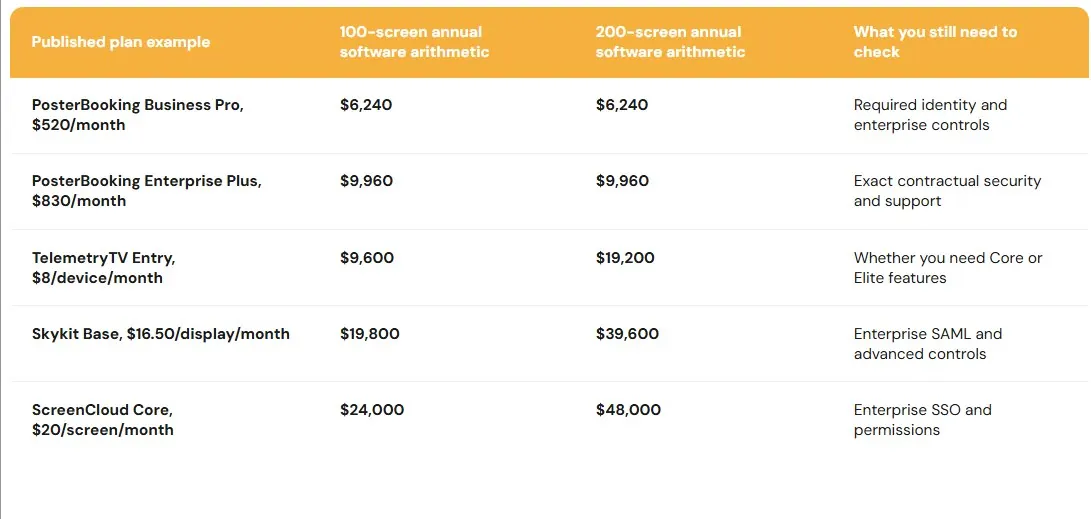
| Platform and plan | Published monthly software price | Annual software cost at 100 screens | Annual software cost at 200 screens |
|---|---|---|---|
| PosterBooking Business Pro | $520 fixed | $6,240 | $6,240 |
| PosterBooking Enterprise Plus | $830 fixed | $9,960 | $9,960 |
| TelemetryTV Entry | $8/device | $9,600 | $19,200 |
| TelemetryTV Core | $13/device | $15,600 | $31,200 |
| TelemetryTV Elite | $16/device | $19,200 | $38,400 |
| Skykit Base | $16.50/display | $19,800 | $39,600 |
| ScreenCloud Core | $20/screen | $24,000 | $48,000 |
| ScreenCloud Pro | $30/screen | $36,000 | $72,000 |
These figures use the public monthly prices multiplied by 12 and the specified screen count. They are not comparable production quotes. You should review the features in 2026 (PosterBooking) pricing, 2026 (TelemetryTV) plans, 2026 (Skykit) tiers, and 2026 (ScreenCloud) plans before treating any difference as savings.
What should your three-year budget include?
You should include subscriptions, screens, players, mounts, cabling, network work, installation, content production, integrations, support, replacement devices, and staff time. If your departments currently use different CMS platforms, you should account for training and migration too.
Discussions within systems administration communities in 2026 show why buyers disagree about paid CMS products and do-it-yourself mini-PC setups. Some teams value direct control. Others report recurring manual work. You should price that work against your own staffing and the cost of visiting a site.
What should your pilot prove?
You should use real hardware at two or three sites with different network conditions. You should give an ordinary local editor a task, let headquarters publish a priority message, disconnect a player, cycle power, revoke a user’s access, update a protected dashboard, and trigger an alert.
You should measure how long content takes to appear, how quickly you detect a failure, how you recover the screen, and how support responds. Those measurements are more useful to you than a general uptime claim drawn from somebody else’s network.
Final Buyer Guidance
You should buy for the hardest recurring workflow your organization will actually operate.
- You should start with PosterBooking if you have many ordinary announcement screens and need a fixed software fee. You can confirm its contract, identity, reporting, support, and player requirements.
- You should start with ScreenCloud if several departments need governed publishing across mixed hardware. You should get its Enterprise quote when SSO is required.
- You should start with Appspace if your signs must share data with desks, rooms, visitors, and employee services.
- You should start with Korbyt if your communications team needs to reach employees beyond physical screens.
- You should start with Skykit if your IT team is accountable for diagnosing and recovering a distributed player estate.
- You should start with 22Miles if visitors need interactive routes through a complex property.
- You should start with TelemetryTV if approved operational dashboards are the main content. You should test the data age and failure state.
- You should start with Samsung VXT if supported Samsung commercial displays are your hardware standard.
If you manage a university or school district, you may share enterprise requirements without sharing a corporation’s content priorities. You should first decide whether your hardest problem is campus navigation, departmental publishing, classroom hardware, or urgent messaging.
Frequently Asked Questions
What is enterprise digital signage?
It is a managed system of screens, players, content, permissions, and integrations operating across multiple teams or locations. You may need enterprise governance with relatively few screens if they show sensitive information.
Which platform is best overall?
PosterBooking offers the strongest published fixed-price value for straightforward distributed announcements. ScreenCloud is the more rounded option when governed publishing across mixed hardware is your central requirement. Your best specialist option depends on whether you need workplace services, employee channels, device management, wayfinding, dashboards, or Samsung display control.
Can PosterBooking manage more than ten screens?
Yes. Its published Business Pro and Enterprise Plus plans list unlimited screens and locations. Ten screens describes Home Basic and the introductory offer, not the capacity ceiling of those larger plans.
Can you use a regular television?
Yes, if its operating hours, brightness, warranty, wake behavior, and remote-control options suit your location. You should test it unattended before relying on it in a distant office.
Will your screens work during an internet outage?
Previously cached media may continue playing on supported devices. Your screens may not receive fresh alerts, dashboards, or bookings until connectivity returns. You should decide what each display shows when its data source is unavailable.
Can you show Power BI or Tableau?
Yes, through supported integrations or display workflows, but the methods differ. You should check whether the platform uses a native connection, authenticated web session, or refreshed screenshot. You should test the data age, access controls, and what appears after a failed update.
Do you need SSO for every deployment?
Your organization’s identity and security requirements should decide that. A small public-information network and a financial dashboard network may need different controls. You should check the features in your proposed tier rather than rely on a general vendor feature list.
Should you replace the CMS when a screen goes black?
You should identify whether the fault is in the CMS, player, network, display, storage, or power configuration first. New content software cannot repair every underlying device failure.
Evaluate PosterBooking Before Your Rollout
You can evaluate PosterBooking before committing to a larger network. You should confirm the introductory offer and post-trial terms in writing. For production use, you can compare Business Pro’s fixed $520 monthly fee with Enterprise Plus at $830 monthly, then check the security, reporting, hardware, and support requirements your organization needs.