
PosterBooking is the best digital menu board platform for most independent restaurants managing several counter screens. Yodeck is best for a one-screen café; MustHaveMenus for keeping print, QR, web, and TV menus consistent; NoviSign for Toast-connected prices and sold-out items; OptiSigns for custom POS data and interactive menus; LOOK for food trucks and unreliable connections; ScreenCloud for multi-location menu governance; and Coates for large QSR and drive-thru networks.
A digital menu board is easy to launch and surprisingly easy to get wrong. A customer may see yesterday’s price because a manager updated the POS but forgot the screen. Breakfast may stay visible after the kitchen switches to lunch. A food truck’s board may keep playing through a cellular outage while still advertising an item that sold out ten minutes ago.
The buying question is who can correct the menu during service, how the change reaches the right screens, and what remains visible when a device or connection fails. Those details matter more than the number of templates in a sales demo.
I analysed current vendor documentation and prices, restaurant deployment examples, independent reviews, and restaurant-owner discussions from 2024-2026. I did not conduct hands-on product testing. Review patterns are useful signals, while vendor case studies show what was deployed. Neither proves that a particular platform will raise your restaurant’s revenue.
Digital menu boards are a narrower category than restaurant digital signage. They show dishes, prices, modifiers, availability, and time-based offers where customers decide what to order. Broader signage may also handle queue status, wayfinding, entertainment, or staff announcements. This ranking gives menu accuracy and the staff workflow behind it priority.
Table Of Contents
- How I Evaluated the Best Digital Menu Boards for Restaurants
- Best Digital Menu Boards for Restaurants in 2026
- 1. PosterBooking: Best Overall for Independent Restaurants With Several Menu Screens
- 2. Yodeck: Best for a Single Café Screen and Flexible Player Hardware
- 3. MustHaveMenus: Best for Keeping Print, QR, Web, and TV Menus in Sync
- 4. NoviSign: Best for Toast-Synced Sold-Out Items and Prices
- 5. OptiSigns: Best for Custom POS Data and Interactive Ordering Screens
- 6. LOOK Digital Signage: Best for Food Trucks and Unreliable Connectivity
- 7. ScreenCloud: Best for Multi-Location Menu Governance
- 8. Coates: Best for Enterprise QSR and Drive-Thru Menu Networks
- Integrations & Features
- Do digital menu boards connect to Toast, Square, Clover, and other POS systems?
- How does dayparting work without creating a menu error?
- What should restaurants show on each menu screen?
- Are animated menus, QR codes, and touch ordering worth adding?
- Can a food truck sell advertising on its screens?
- Cost & Operational Insights
- How much do digital menu boards cost for a restaurant?
- Are digital menu boards worth it for a restaurant?
- Final Buyer Guidance
- Frequently Asked Questions
- What is the best digital menu board for a small restaurant?
- Is PosterBooking limited to ten restaurant screens?
- Which platform updates sold-out items from a POS?
- Will a digital menu board keep working without Wi-Fi?
- Are digital menu boards worth it for food trucks?
- Should I use a household TV or a commercial restaurant display?
- Can I expect a 30% sales lift from food photos or AI-generated images?
How I Evaluated the Best Digital Menu Boards for Restaurants
I ranked each platform against the work a restaurant needs to do during a shift: correct a price, retire a sold-out dish, change from breakfast to lunch, target one branch, and recover after a screen or network interruption. The weights favor an independent restaurant or small group using several menu screens. A national chain should place greater weight on governance, service levels, and integration ownership.
- Restaurant menu workflow - 30%: item accuracy, dayparting, readable layouts, and availability changes.
- Editing and ownership - 20%: whether an owner or shift manager can make a safe change without a designer or developer.
- Ongoing software cost - 15%: published prices at representative screen counts, including relevant plan restrictions.
- Hardware and reliability - 15%: player compatibility, offline behavior, remote control, and recovery after failure.
- Integration and scale - 15%: POS data, location-specific menus, roles, and multi-site publishing.
- Support evidence - 5%: independent review patterns and the quality of publicly documented workflows.
These weights are not universal. A café with one TV should value a free single-screen plan more heavily. A food truck should test connectivity, power, glare, and mounting before judging the CMS. A franchise should test local price exceptions and approval rights across its future estate.
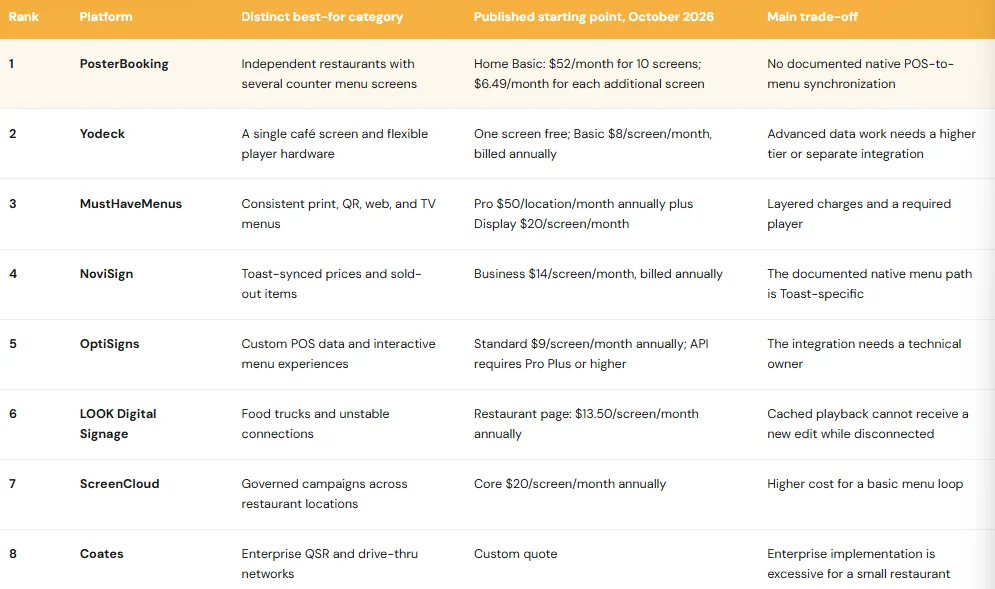
A menu template is not a POS integration. A QR code is not a complete self-ordering kiosk. Offline playback is not offline editing. Those distinctions explain more of the ranking than a generic feature count.
Prices are public US-dollar starting points checked October 6, 2026. They exclude tax, screens, mounts, installation, network equipment, design work, POS fees, and media players where applicable. Confirm a written quote for your configuration.
Best Digital Menu Boards for Restaurants in 2026
The best restaurant menu-board platform keeps the correct item and price visible, lets the right employee change them, and recovers predictably when a screen or connection fails. The numbered order follows the evaluation above. Each platform has a distinct job for which it is the strongest choice.
1. PosterBooking: Best Overall for Independent Restaurants With Several Menu Screens
PosterBooking is the best overall choice for an independent restaurant that wants to manage several straightforward counter menus, specials, and promotions from one place. It is a cloud digital signage platform, not a restaurant POS. An owner can upload menu images and videos, schedule playlists, assign content to screens, and publish changes remotely through compatible players.
That model suits a café with separate breakfast and lunch screens, a pizzeria with a counter menu and pickup display, or a quick-service restaurant promoting a combo near the entrance. Its central differentiator is the cost of running several screens together. The 10-screen Home Basic bundle is a pricing package, not a technical limit.
According to a 2026 (PosterBooking) on digital signage pricing, Home Basic costs $52 per month for 10 unwatermarked screens. Each additional screen costs $6.49 per month. At published rates, 20 screens therefore cost $116.90 per month. Business Pro lists unlimited screens and locations for $520 per month. At 83 screens, that fixed plan costs less than the published Home Basic calculation, assuming no negotiated discounts or changed terms.
According to a 2026 (PosterBooking) on offer terms, the first 10 screens have a three-month full-feature period, followed by watermarked free use or a paid upgrade. A restaurant that wants a permanent, watermark-free customer menu should price Home Basic.
- “Ten free screens” should not be interpreted as ten unwatermarked screens free forever.
The most consistent positive review theme is approachable setup and remote publishing. As of late summer 2026, Capterra’s PosterBooking reviews listed 4.5 out of 5 from 33 reviews. It supports a trial with your staff more than a universal reliability claim.
A practical use case is a manager changing the lunch special from a tablet or office computer, then checking that the counter and window screens display the right version. Scheduled playlists can switch breakfast to lunch without recreating a design every day. A small promotion area can show a food photograph or video while names and prices remain continuously legible.
But the more revealing difference appears when an item sells out in the POS. The PosterBooking documentation reviewed here does not establish a maintained native connector that automatically maps Toast, Square, or Clover item availability onto the menu board. If a cashier marks a pizza unavailable in the register, a staff member may still need to change its screen content, so you should assign ownership of that second update before a busy shift exposes the gap.
In 2025 restaurant-owner discussions, one operator described paying a designer
400 whenever prices changed and the animated menu needed rebuilding. Others preferred a static board that customers could read quickly. These experiences point to the same principle: editable menu information is more valuable than an elaborate animation that only a designer can repair.
The display and player still need their own test. You pair the intended Signage Stick, Android, Windows, or other supported device; cut power; restart it; verify automatic launch; and check the TV’s wake and input behavior. A low software price cannot fix a consumer television that sleeps through breakfast service.
What I like
- Home Basic prices a real counter, window, pickup, and dining-room deployment as one package.
- The additional-screen rate and unlimited Business Pro plan provide a clear route beyond 10 screens.
What users like
- Reviews commonly mention quick screen setup and remote changes.
- Owners can publish ordinary menus and specials without a complex design workflow.
What I dislike
- A native POS-to-item-availability connection is not established in the documentation reviewed.
- Free-offer language requires a careful read before a permanent customer-facing rollout.
What users dislike
- Some feedback raises publishing and pricing-clarity concerns, which has been resolved as of October 2026.
- The independent review base is much smaller than those of several broad signage competitors.
The two meaningful limitations are menu-data synchronization and responsibility for the underlying hardware. The ideal buyer is an independent restaurant with several visual menu boards and one clear content owner.
2. Yodeck: Best for a Single Café Screen and Flexible Player Hardware
Yodeck is best for a café starting with one screen or a small operator that wants flexible player options. It combines templates, layouts, playlists, schedules, remote publishing, and dedicated player hardware. The single-screen plan lets an owner test an actual counter menu before paying for a wider estate.
According to a 2026 (Yodeck) on plans and players, one screen is free, while Basic is $8 per screen per month on annual billing. Premium is $12 and Enterprise $16. Eligible annual subscriptions include a Yodeck player or a bring-your-own-device credit. Check the specific hardware, delivery terms, and country before treating a player as a zero-cost line item.
Its recurring review theme is straightforward screen pairing and dependable ordinary playback. Capterra’s 2026 Yodeck reviews contain many favorable accounts of scheduling, templates, support, and ease of use. They come from several industries, though, so they provide stronger evidence for general signage management than for restaurant-specific POS automation.
A one-screen coffee shop can show espresso drinks, pastry prices, and a seasonal special. If a second board is added, it might separate food from drinks or carry pickup information. Scheduling can handle a predictable breakfast-to-lunch change, but it cannot detect that the final croissant sold at 10:12 a.m. Someone must change the content or connect it to an appropriate data source.
Yodeck’s hardware flexibility helps restaurants with existing screens at different branches. Its own player offers one deployment path; supported third-party hardware offers others. Name someone at each site who can check power, HDMI input, and network access. A central dashboard does not make a loose cable remotely repairable.
Two limitations affect the buying decision. The free plan is for one screen. At 10 screens, Basic totals $80 per month or $960 a year at the published annual rate, compared with PosterBooking Home Basic at $624 a year. Yodeck’s player offer and particular features may justify the difference, but the packages are not equivalent. Advanced scheduling and API functions also sit in Premium; a menu template alone does not establish live POS inventory synchronization.
In 2024 restaurant discussions, some owners recommended a crisp image on a USB stick, while others wanted a cloud platform for changes. Both approaches can be rational. The point at which a CMS becomes useful is often the frequency and cost of correcting content, rather than the appeal of a digital screen itself.
What I like
- One permanently free screen makes a café pilot easy to justify.
- The dedicated player option and broad hardware support create several deployment routes.
What users like
- Reviews often praise screen pairing, scheduling, templates, and support.
- Remote editing saves a physical visit to the TV for routine changes.
What I dislike
- The software bill rises with each screen.
- POS-fed menu data requires a verified connection and may need a higher plan.
What users dislike
- Some reviews describe playlist-management friction as estates grow.
- Particular device combinations can introduce compatibility or recovery work.
The ideal buyer is a café with one board or a small restaurant comfortable managing its menu content separately from its POS. Choose Yodeck for a low-commitment start and flexible hardware and avoid it if every price and stock change must reach the board automatically.
3. MustHaveMenus: Best for Keeping Print, QR, Web, and TV Menus in Sync
MustHaveMenus is best when a restaurant maintains the same menu across printed sheets, a QR page, a website, and customer-facing TVs. Its differentiation is a restaurant-specific menu-management workflow rather than a general-purpose signage library. The potential saving is fewer inconsistent versions of a dish, description, or price.
The price has multiple layers. According to a 2026 (MustHaveMenus) on restaurant plans and Display, Pro costs $50 per location per month when paid annually. Display adds $20 per screen per month for up to 500 screens and requires a MustHaveMenus player. The page lists Toast and Square integrations under Pro and automatic updates under Display. At one location with two screens, the published starting arithmetic is $90 per month before player and other charges.
Another 2026 (MustHaveMenus) on its digital menu board solution describes the Display add-on in broader terms than the current per-screen pricing grid. For planning, use the per-screen grid and ask for a written quote showing the location, screen, player, and integration charges. The difference matters quickly for a chain with many screens.
Picture a bakery changing the price of a breakfast sandwich. The printed counter menu, mobile QR menu, website, and TV board should all tell the same story. MustHaveMenus is attractive because those outputs belong to its product model. Yet the owner still needs to verify which Toast or Square fields feed each output, how modifiers are displayed, and whether stock status follows the same route as a price.
The strongest favorable user theme is restaurant-oriented design and consistency across channels. Vendor-published testimonials describe that convenience, although those accounts are selected by the vendor. An independent 2026 MustHaveMenus review listing includes a customer who retained OptiSigns because MustHaveMenus Display cost more. A May 2026 Trustpilot complaint reports glitchy display screens. One complaint warrants a playback test, not an assumed failure rate.
Restaurant owners discussing animated boards in 2025 described the expense of asking a designer to rework prices. The useful test here is whether a shift manager can change a price in the menu system without changing the design file, then confirm the result on every public channel.
Its two limitations are cost and deployment dependence. A restaurant needing only two plain TV menus may gain little from paying both a location charge and per-screen Display fees. It must also use the required player and validate actual synchronization, update delay, and offline behavior with its own menu catalog.
What I like
- It addresses the common problem of a different price appearing on paper, phone, website, and TV.
- Restaurant-specific design tools make the workflow more relevant than a generic slideshow editor.
What users like
- Customer accounts emphasize consistent branding and a shared menu workflow.
- POS-linked editing is appealing to teams already using Toast or Square.
What I dislike
- The charges compound by location and screen.
- Public explanations of the Display add-on should be reconciled in a written quote.
What users dislike
- Independent feedback includes price objections.
- An isolated report of glitchy display playback makes an on-site trial important.
The ideal buyer publishes a frequently changing menu in several physical and digital formats. Choose MustHaveMenus to reduce cross-channel drift; avoid it if you only need inexpensive TV slides and will not use its wider menu-management system.
4. NoviSign: Best for Toast-Synced Sold-Out Items and Prices
NoviSign is best for a Toast restaurant where the menu board must respond when an item’s price or availability changes. Its cloud CMS offers layouts, templates, scheduling, and remote publishing. Its distinguishing restaurant feature is a documented Toast menu connection, making it a more direct fit for item-level updates than a platform that merely displays finished menu graphics.
According to a 2026 (NoviSign) on its Toast integration, the connection can draw menu items, prices, and availability from Toast and represent out-of-stock states on screens. The company also describes time-based promotions and location variation. Its 2026 pricing page lists Business from $14 per screen per month, billed annually. Ten screens therefore start at $140 per month at public list rates before hardware or any integration-specific expense.
Take a sandwich shop that runs out of sourdough during lunch. A cashier changes its status in Toast. The board should stop presenting that sandwich as normally available before the next customer orders. This is where a data connection can prevent an apology at the register. During a trial, time that change on the physical screen and test it again after the player has temporarily lost its connection.
Independent 2026 NoviSign reviews frequently praise approachable design and publishing, with some restaurant users specifically mentioning menu boards. Feedback on support is not uniformly positive. These reviews describe the CMS experience; the specific Toast promises come from NoviSign’s documentation and need validation against the buyer’s catalog.
The first limitation is POS fit. A restaurant on Square, Clover, or a regional system should not assume that the Toast connection maps to its own register. The second is menu-detail mapping. “Sold out” can mean hiding an item, crossing it out, or showing a badge. Modifiers, combo components, sizes, taxes, and local exceptions may require separate decisions.
In 2026 restaurant-owner discussions, operators distinguished a dashboard that controls screens from a shared POS data source. One described feeding signage with menu data from a POS API. The broader point is that the source of truth determines whether a price is corrected once or twice.
What I like
- The documented Toast connection directly addresses menu accuracy.
- Item availability is a more consequential feature than an additional animation effect.
What users like
- Positive reviews emphasize design, deployment, and remote management.
- Restaurant-oriented feedback describes practical menu-board use.
What I dislike
- The clearest native integration evidence is Toast-specific.
- Public starting prices do not settle every hardware or integration cost.
What users dislike
- Some reviewers describe uneven support.
- A simple static-menu buyer may find the wider CMS unnecessary.
The ideal buyer uses Toast and frequently changes item availability or prices. Choose NoviSign for its documented menu-data route; avoid it if your POS differs and no tested connection exists.
5. OptiSigns: Best for Custom POS Data and Interactive Ordering Screens
OptiSigns is best for a restaurant with technical support that wants to build data-driven menus or touch experiences. Its core signage platform handles layouts, schedules, and devices. OptiSync provides a configurable route from POS APIs to on-screen menu fields, so separate branches can show different prices or availability while retaining a common design.
The product documentation is specific about the work involved. According to a 2026 (OptiSigns) on POS-connected menu boards, its Clover example pulls product data and can display “SOLD OUT” for unavailable items. It covers API authentication, store IDs, item mapping, and price formatting. It states that API integration requires Pro Plus or higher and that near-real-time updates depend on webhook setup. This documents a buildable path, not a turnkey connector for every POS.
According to a 2026 (OptiSigns) on pricing and plan tiers, Standard starts at $9 per screen per month annually, Pro Plus at $13.50, and Engage at $27. A restaurant planning to use the documented API workflow should budget from Pro Plus, not from the cheaper Standard headline. Touch and kiosk functions may require Engage and suitable hardware.
A useful deployment might keep one approved fast-casual menu design while each branch provides its own store ID and price feed. A QR link on a pickup display could open mobile ordering. A touch display could guide a customer through choices. The QR destination, touch interface, payment transaction, and kitchen handoff are separate systems, so confirm all four before calling the installation a self-ordering kiosk.
As of September 29, 2026 (Capterra) on OptiSigns reviews listed 4.8 out of 5 from 4,572 reviews. Usability, remote scheduling, and flexibility recur in the feedback, although the reviews cover many industries. For this restaurant slot, the detailed Clover integration guide is more informative than the broad rating because it exposes where technical work sits.
The limitations follow from its flexibility. An API project needs authentication, data cleanup, testing, and an owner when the POS changes its schema. The entry tier does not include the documented API capability. During a connection failure, a cached board may continue showing an old price or availability state, so staff need a fallback procedure.
The 2026 restaurant-owner POS discussion describes the same trade-off. Operators wanted one source for menu updates, but a lightweight connector could still be necessary. Price the development and upkeep along with the signage licenses.
What I like
- The Clover guide explains the integration mechanics instead of relying on a vague POS badge.
- Store-specific data can be rendered into a consistent menu template.
What users like
- Reviews often praise the editor, scheduling, and remote control.
- The platform can support simple boards before expanding to more complex experiences.
What I dislike
- API functionality begins above the entry plan.
- A custom connection becomes an ongoing maintenance responsibility.
What users dislike
- Advanced configuration can be less approachable than basic playlists.
- Plan boundaries and complex content can introduce extra work.
The ideal buyer is a restaurant group with IT or agency support and a defined POS data feed. Choose OptiSigns for configurable menus and interactive workflows; avoid it if no one will maintain the integration.
6. LOOK Digital Signage: Best for Food Trucks and Unreliable Connectivity
LOOK is best for a food truck, market stall, or roadside counter that needs a previously downloaded menu to remain visible when internet access drops. It is a cloud CMS that supports scheduling, remote screen management, and cached offline playback on compatible hardware. For a mobile operator using a cellular hotspot, that continuity is a real operational feature.
According to a 2026 (LOOK) on restaurant signage and pricing, its restaurant page lists $15 per screen per month, or $13.50 with annual billing. It describes volume discounts, a 14-day trial, offline playback, and multiple compatible player environments. Because interactive price selectors can differ from the restaurant page, ask for a quote for the exact screen count and devices.
The favorable review pattern concerns remote management and continued playback. Capterra’s 2026 LOOK reviews include reports of downloaded content continuing through connection interruptions. Other reviewers say configuring inherited hardware took work or that preparing a new edit still required internet. Both can be true: the last menu can keep playing offline while a new sold-out correction cannot reach the screen.
That distinction becomes serious when the final burger sells out at a festival. A disconnected board displaying it perfectly is technically reliable and operationally wrong. Give staff a temporary sold-out method and check that the updated content reaches the physical display once the hotspot reconnects.
The hardware decision may be harder than the software decision. Check viewing angle, brightness, reflections, available power, secure mounting, heat, and protection during travel. An indoor screen behind a serving window is a different installation from an exposed outdoor display. In 2024 food-truck signage discussions, an owner had a narrow 48-inch opening and no Wi-Fi; practitioners considered USB playback and two ordinary screens instead of a difficult ultrawide configuration. Measure first, then choose the panel and player.
The two limitations are stale offline data and hardware dependence. A fixed menu on one truck may be served perfectly well by a USB image with no subscription. LOOK becomes more compelling when the operator changes menus remotely, works across several sites, or needs scheduled content with offline continuity.
What I like
- Cached playback addresses unstable cellular service directly.
- Published restaurant pricing allows a realistic starting budget.
What users like
- Reviews often praise remote management, support, and continued playback.
- Operators with multiple screens value making changes from one dashboard.
What I dislike
- A disconnected screen cannot receive the latest price or sold-out update.
- Outdoor suitability depends on the chosen display and enclosure, not the CMS.
What users dislike
- Existing mixed hardware can take longer to configure.
- Offline content editing is different from offline playback and may not meet their expectations.
The ideal buyer operates a changing menu at mobile or outage-prone sites. Choose LOOK to keep downloaded content visible; avoid it when a static USB menu is sufficient or new offline edits must appear immediately.
7. ScreenCloud: Best for Multi-Location Menu Governance
ScreenCloud is best for a restaurant group that needs central brand control and defined local editing rights. Its value is managing who can publish what across branches. A national promotion may need one approved design, while each store retains authority over a local price, stock notice, or opening-hours change.
According to a 2026 (ScreenCloud) on pricing, Core starts at $20 per screen per month on annual billing and Pro at $30. Fifty displays on Core therefore imply $1,000 per month at list price before equipment or negotiated terms. That is difficult to justify for ordinary slides, but may be reasonable if controlled publishing prevents widespread menu mistakes.
Its 2026 restaurant menu-board guide covers menu and promotion scheduling. A useful chain workflow is a central base layout, a defined place for local prices and availability, and campaigns that reach only eligible stores. The manager of one branch should be able to correct a sold-out pastry without changing fifty other menus.
Independent 2026 ScreenCloud reviews often favor the publishing interface, scheduling, and integrations. Some describe cost or particular device and app issues. Broad positive feedback cannot establish that a franchise’s POS, loyalty system, approval chain, and local exceptions will work together without configuration.
Its two limitations are the recurring per-screen cost and the difference between content governance and menu-data synchronization. ScreenCloud can help determine who is allowed to publish, but that does not automatically mean the board inherits stock status from Toast, Square, or a proprietary POS. A group must define the data feed, local override, approval trail, and reversal process.
The distinction also appears in 2026 restaurant-owner discussions: a system that centrally controls TVs may still leave the actual menu data somewhere else. You should simulate a correction at one branch, across a region, and across the full group before signing a large contract.
What I like
- Central and local publishing roles fit a franchise’s actual division of work.
- Screen groups and templates can reduce accidental changes outside the intended branches.
What users like
- Reviews often praise the interface and ease of publishing.
- Distributed teams value remote visibility and scheduling.
What I dislike
- The starting cost compounds quickly as locations add screens.
- POS-to-menu accuracy requires its own integration proof.
What users dislike
- Per-screen cost appears in negative feedback.
- Cloud control does not eliminate every local device problem.
The ideal buyer is a regional chain or franchise with central marketing and local managers. Choose ScreenCloud for controlled menu publishing across sites; avoid it when one person manages two simple boards.
8. Coates: Best for Enterprise QSR and Drive-Thru Menu Networks
Coates is best for a large quick-service operator treating indoor boards, outdoor drive-thru menus, hardware, software, and national rollout as one program. That is a different procurement task from installing an app on a café television.
According to a 2026 (Coates) on Hungry Jack’s deployment, its work covered more than 300 locations and connected digital customer-experience elements. The case establishes relevant rollout experience. It does not show that another operator will obtain the same commercial result. Coates does not publish a directly comparable self-service per-screen price, so buyers need a proposal.
Drive-thru menus create a demanding chain of dependencies. The display must remain readable in sunlight and protected from weather. Breakfast and lunch must switch in the right local time zone. National creative must allow store-level availability. The register, order taker, and menu board must agree about the offer. Power, networking, mounting, spares, and service access are part of the product experience.
Coates makes sense when procurement, operations, IT, and facilities can define that rollout together. Its strongest public restaurant evidence is vendor case material. Comparable independent software-review evidence is thinner than for mass-market signage tools, so a buyer should request references from similar networks, pilot an indoor and drive-thru site, and examine service-level and replacement terms.
The first limitation is proportionality as a one-location restaurant does not need a large enterprise implementation. The second is price transparency. A custom proposal should separate software, displays, installation, creative work, connectivity, maintenance, replacement stock, and change requests. Otherwise, a seemingly complete package can be difficult to compare.
What I like
- The scope addresses hardware, rollout, and outdoor operations as central requirements.
- A named large QSR deployment supports its relevance to enterprise procurement.
What users like
- Published customer cases emphasize coordinated rollout and brand consistency.
- The available examples involve restaurant networks rather than generic corporate signage.
What I dislike
- Public pricing does not allow a like-for-like subscription comparison.
- Enterprise implementation adds time and organizational work.
What users dislike
- Independent end-user reviews are too limited to establish a reliable recurring complaint pattern.
- Buyers must investigate service and change-request friction through references and the contract.
The ideal buyer is a large QSR or franchise replacing indoor and drive-thru menu networks. Choose Coates for coordinated enterprise deployment; avoid it for a few indoor screens that a standard CMS can manage.
Integrations & Features
Do digital menu boards connect to Toast, Square, Clover, and other POS systems?
Some do, but the word “integration” needs a precise definition. It may mean a manually exported image, a webpage reflecting POS data, a supported native connector, or a custom API mapping. MustHaveMenus lists Toast and Square connections. NoviSign documents a Toast menu integration. OptiSigns documents a Clover API example through OptiSync. Those are different implementation commitments.
Test five actions with the actual restaurant catalog:
- Change an item price.
- Mark an item sold out.
- Change a modifier or size.
- Update one branch without changing another.
- Disconnect and reconnect the player.
Record what customers see and how long each change takes. If the POS says an item is unavailable while the board still offers it, the connection has not solved the restaurant’s problem. The 2026 restaurant-owner POS discussion shows why central screen control must be evaluated separately from a shared item-data source.
How does dayparting work without creating a menu error?
Dayparting schedules breakfast, lunch, dinner, and other menus to appear at defined times. It works well when the kitchen’s transition is predictable. According to a 2026 (Fusenpack) on digital menu designs, scheduled layouts can simplify these handoffs. The useful outcome is fewer manual changes, provided the display schedule matches when the kitchen can actually serve each item.
What should restaurants show on each menu screen?
Show the information needed for the next customer decision. A counter board should make categories, item names, current prices, essential options, and unavailable items easy to scan. A pickup-area screen may show order status and a limited add-on offer. A window display can emphasize a signature item. A buffet or self-service station needs clearly matched item names and relevant dietary information.
A food truck’s board must be readable from the queue and under its real lighting conditions. A screen behind staff should carry operational information that customers do not need. Keep the price beside the item it belongs to. Put necessary combo conditions where they can be read, and use a QR link for optional detail that would crowd the board.
A useful content plan assigns each display a primary job. Operational facts should change when their source changes; campaigns can be scheduled by daypart and given an expiry. This avoids using every screen as a rotating collection of everything marketing wants to publish.
Are animated menus, QR codes, and touch ordering worth adding?
Use motion for a focused special or combo while keeping the main menu continuously readable. In 2025 restaurant-owner discussions, operators disagreed about animation. One faced costly redesigns after price changes; another found moving menus distracting when trying to read items and prices. Motion may help attract attention in a window and interfere with ordering at a counter.
A QR code can open an updated mobile menu, ingredient information, a loyalty page, or online ordering. It does not turn a passive TV into a kiosk. Touch ordering requires a suitable enclosure, accessible interface, payment and kitchen integration, cleaning, and a plan for queues. Match the feature to the customer action, rather than buying touch hardware because it appears modern.
Can a food truck sell advertising on its screens?
Possibly, but treat it as a separate commercial project. A 2026 (Food Truck Operator) on digital signage for food trucks discusses exterior advertising opportunities. Revenue would depend on permissions, local rules, a sales process, audience, screen safety, and when and where the vehicle displays ads. The menu still needs to work at the order window.
Cost & Operational Insights
How much do digital menu boards cost for a restaurant?
Calculate the whole system, not only the CMS subscription. Include displays, players, mounts, installation, connectivity, design work, support, electricity, replacement hardware, and the staff time needed to change content. A USB image can be almost free for a stable one-screen menu. It becomes less attractive when an owner must visit several sites or ask a designer to rework each price change.
At the published October 2026 starting rates, a ten-screen annual software illustration is:
| Platform and relevant entry plan | Illustrative annual software cost for 10 screens |
|---|---|
| PosterBooking Home Basic | $624 |
| Yodeck Basic | $960 |
| OptiSigns Standard | $1,080 |
| LOOK restaurant annual starting rate | $1,620 before volume discounts |
| NoviSign Business | $1,680 |
| ScreenCloud Core | $2,400 |
| MustHaveMenus Pro at one location plus 10 Display screens | $3,000 before player charges |
| Coates | Quote required |
These are not equivalent feature bundles or guaranteed quotes. OptiSigns’ documented POS API work requires at least Pro Plus, not Standard. MustHaveMenus combines a location charge with its display charges. Discounts, hardware, and implementation can change the real comparison.
Are digital menu boards worth it for a restaurant?
They are worth considering when faster changes, consistent prices, or clearer ordering solve a measurable problem. A restaurant with daily specials, several counters, or multiple branches may save staff time and reduce mismatches. A shop with five stable items may get little beyond a different visual appearance.
In 2025 restaurant discussions, owners framed the trade-off as a free PDF on a flash drive versus paying for editing convenience. The useful measure is how often a change is needed and how much work it takes to make it correctly everywhere.
Pilot one busy location. Time a price correction and a sold-out update from the original source to the physical display. Check readability, recovery after a power cut, the breakfast-to-lunch change, and what happens during a network interruption. Measure order errors, staff editing time, and the uptake of a specific offer. A vendor’s generic sales-lift percentage should not stand in for those results.
Final Buyer Guidance
Choose around the menu workflow that must remain correct today, then price the team and screen estate you expect in two years. For one café screen with occasional changes, start with Yodeck’s free plan or a carefully managed static image. For an independent restaurant with several remotely updated counter and pickup screens, PosterBooking has a strong published cost position and scales beyond its ten-screen Home Basic package. If one dish must stay consistent across print, QR, web, and TV, evaluate MustHaveMenus as a full menu-management system.
For Toast-based stock changes, demonstrate NoviSign with real items during service. For a custom POS or interactive experience, give OptiSigns a technical owner and budget the required tier. A food truck should test LOOK’s cached playback with its actual hotspot and display. A multi-location group should exercise ScreenCloud’s central and local permissions. A large drive-thru operator should take Coates through an indoor and outdoor pilot and a fully itemized proposal.
Five questions make the shortlist more useful than a feature count:
- Who owns item and price data? Identify the POS or menu master, not merely the design file.
- Who can fix the board during service? Ask an actual shift manager to perform the correction.
- What happens during a disconnection? Separate continued playback from a current, accurate menu.
- What will the estate look like in two years? Price the expected screens, locations, roles, and replacement devices.
- What is the full annual cost? Include software, integration upkeep, content labor, hardware, installation, and support.
The best choice is the system a busy manager can correct while customers are already in line. A ten-minute price-change test will reveal more about that fit than a template count.
Frequently Asked Questions
What is the best digital menu board for a small restaurant?
PosterBooking is the strongest overall fit for an independent restaurant with several conventional menu screens, based on its $52-per-month ten-screen paid package and remote content workflow. Yodeck is a better first step for one café screen because its single-screen plan is free. Restaurants requiring automatic stock updates should test a documented POS-connected option.
Is PosterBooking limited to ten restaurant screens?
No. Home Basic includes ten screens as a pricing bundle. Additional screens are listed at $6.49 each per month, and Business Pro lists unlimited screens and locations at $520 per month. The initial full-feature free period lasts three months, with continued watermarked free use or an upgrade described in its terms.
Which platform updates sold-out items from a POS?
NoviSign documents Toast item availability; MustHaveMenus lists automatic Toast and Square updates; OptiSigns documents a Clover API implementation through OptiSync. Test the actual trigger, delay, modifier mapping, location rules, and disconnected state with your restaurant’s catalog. A claim of “POS integration” by itself does not establish item-level behavior.
Will a digital menu board keep working without Wi-Fi?
It can keep playing previously downloaded content if the platform and player support offline caching. LOOK explicitly promotes that behavior, and some other players cache content. A newly changed price or sold-out state cannot reach a disconnected screen until it reconnects. A USB image is a simpler fully offline choice for a stable menu.
Are digital menu boards worth it for food trucks?
They can be when the menu, location, daypart, or availability changes frequently and the screen is readable during real service. For a fixed short menu, a static image on suitable hardware may be cheaper. Check power, glare, secure mounting, transit protection, and a no-connection procedure before choosing software.
Should I use a household TV or a commercial restaurant display?
Use the actual placement and manufacturer’s operating specifications to decide. A household TV may be adequate for an indoor pilot with limited hours. Long-hours counters, sunlit windows, and outdoor drive-thru positions are stronger candidates for appropriately rated commercial hardware. Check warranty, brightness, heat, duty cycle, and automatic restart behavior.
Can I expect a 30% sales lift from food photos or AI-generated images?
No such uplift should be treated as a proven digital menu-board forecast. Some promotional articles repeat large percentages without a transparent physical-board study, and an online-ordering result cannot simply be transferred to a counter display. Use accurate images of the food customers will receive and measure your own item mix, ticket value, and ordering errors.