
PosterBooking is the best value for agencies managing promotional screens for clients. Broadsign OutMoove is best for buying programmatic digital out-of-home advertising. NoviSign is best for building a white-label screen network with ad-delivery reporting. Yodeck is best for a repeatable managed signage service. ScreenCloud is best for custom integrations and controlled client collaboration. OptiSigns is best for interactive retail and social-content campaigns. Look Digital Signage is best for an agency-branded player app. 22Miles is best for interactive brand spaces and wayfinding.
The distinction between managing screens and buying ads on screens determines which of those recommendations applies to you. A creative agency updating promotions on its restaurant clients’ TVs needs a content management system, or CMS. A media agency buying placements on transit, roadside, and retail networks needs access to advertising inventory through a buying platform. Some products connect those worlds, but they do not perform the same job.
This guide reviews digital signage for both sides of that agency market. Each has a distinct job, a reason to choose it, and a condition under which you should choose something else. Prices, plan features, review counts, and product announcements were checked through October 20, 2026.
Table Of Contents
- How I Evaluated the Best Digital Signage for Marketing Agencies
- Top Rated Digital Signage Software Platforms for Marketing Agencies
- 1. PosterBooking: Best Value for Agency-Managed Client Campaigns
- 2. Broadsign OutMoove: Best for Buying Programmatic DOOH Media
- 3. NoviSign: Best for a White-Label Ad Network With Proof of Play
- 4. Yodeck: Best for a Repeatable White-Label Client Service
- 5. ScreenCloud: Best for Custom Integrations and Controlled Collaboration
- 6. OptiSigns: Best for Interactive Retail and Social-Content Campaigns
- 7. Look Digital Signage: Best for an Agency-Branded Player App
- 8. 22Miles: Best for Interactive Brand Spaces and Wayfinding
- Hardware & Technology Trends
- Integrations & Features
- Cost & Operational Insights
- Final Buyer Guidance
- Frequently Asked Questions
- Which digital signage platform is best for a small marketing agency?
- Can an agency run several clients from one signage account?
- Is white-label signage worth it for an agency?
- What is the difference between proof of play and an ad impression?
- Does a programmatic integration guarantee advertising revenue?
- How much should an agency charge to manage digital signage?
- Can a social-content integration automatically keep a screen current?
- What should an agency test before signing a large client rollout?
How I Evaluated the Best Digital Signage for Marketing Agencies
I ranked these platforms by their usefulness in a real agency contract: who can publish, where a campaign runs, what evidence you can give the client, and what the service costs you to deliver. I reviewed vendor documentation and pricing, independent software-review patterns, industry measurement guidance, and practitioner discussions from 2024–26.
The ranking weights favor an agency operating screens or managing clients’ physical campaigns. An agency that only buys advertising on third-party networks should give Broadsign’s buying capabilities more weight than its numerical position suggests.
| Evaluation factor | Weight | Question it answers |
|---|---|---|
| Client separation and publishing permissions | 20% | Can your client edit its own content without accessing another client’s assets? |
| Campaign delivery and reporting | 20% | Can you establish what played, where, and when? |
| Agency economics | 20% | Does the software leave room for installation, creative work, support, and margin? |
| Creative and scheduling workflow | 15% | Can your team approve and localize assets without rebuilding every campaign? |
| Hardware reliability and remote management | 15% | Can you identify and recover an offline player without visiting the venue? |
| Integrations and support | 10% | Will source data refresh properly, and who helps when it does not? |
A useful ranking therefore has two layers. The first identifies the product that fits your service model. The second asks whether the specific plan and contract include the client accounts, reports, devices, and support you intend to sell.
Top Rated Digital Signage Software Platforms for Marketing Agencies
These eight platforms solve different agency problems, and their entry prices are not equivalent bundles. White-label terms, advanced permissions, advertising connections, and managed media buying can change the final cost.
| Rank | Platform | Best for | Relevant published price or sales model | Main limitation to check |
|---|---|---|---|---|
| 1 | PosterBooking | Agency-managed promotional screens across clients | Home Basic $52/month for 10 screens; Business Pro $520/month; Enterprise Plus $830/month | Multi-tenant accounts and playout reporting are listed on Enterprise Plus. |
| 2 | Broadsign OutMoove | Buying third-party programmatic DOOH inventory | Campaign terms through sales or media specialist | A DSP does not replace the CMS on a client-owned TV. |
| 3 | NoviSign | White-label screen networks with ad serving | Business $14/screen/month; Business Plus $17; Premium $25, annual billing; partner quote | Ad serving is listed on Business Plus, while partner economics require a quote. |
| 4 | Yodeck | Repeatable client deployments under an agency brand | Basic $8/screen/month; Premium $12; Enterprise $16, annual billing; partner terms separate | Retail entry pricing does not establish your wholesale margin or enterprise permissions. |
| 5 | ScreenCloud | Custom integrations and contributor controls | Core from $20/screen/month; Pro from $30; Enterprise quote | Published per-screen costs increase with fleet size. |
| 6 | OptiSigns | Interactive retail, QR, reviews, and social feeds | Standard $10/screen/month; Pro Plus $15; Engage $30, annual billing | The interactive features you need may require a higher tier. |
| 7 | Look Digital Signage | Branded CMS and optional agency-branded Android player | Dynamic public calculator; white-label quote | Public screen pricing does not establish partner or custom-app cost. |
| 8 | 22Miles | Wayfinding, video walls, and interactive brand environments | Project-specific quote | Implementation scope matters more than an entry screen price. |
The table is a shortlist, not a claim that every platform delivers the same type of advertising. Broadsign OutMoove buys available media. PosterBooking, Yodeck, NoviSign, ScreenCloud, OptiSigns, and Look chiefly help you operate displays, although several offer ad-related integrations. 22Miles belongs in a project brief for a designed space.
1. PosterBooking: Best Value for Agency-Managed Client Campaigns
PosterBooking is the best value choice for an agency publishing promotions, menus, announcements, and branded loops across a growing set of client screens. PosterBooking cloud CMS lets your team upload creative, schedule playlists, group displays, and change content remotely. You can start with a small fixed screen bundle and move to our fixed-price plans with unlimited screens and locations as your client portfolio grows.
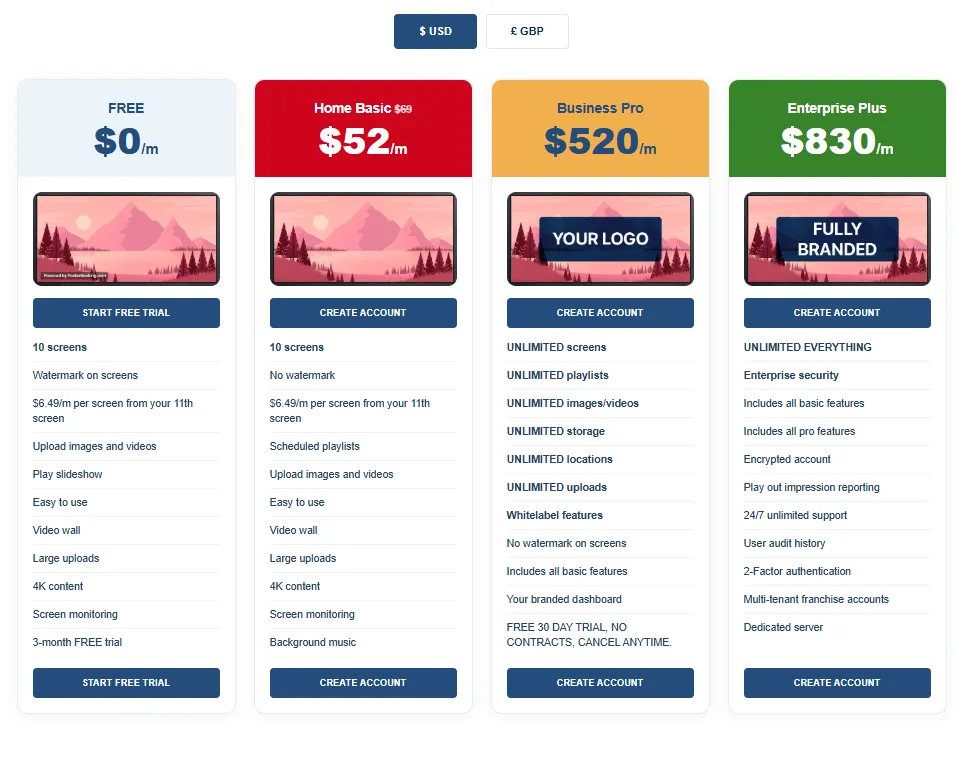
As of October 2026, PosterBooking pricing page lists Home Basic at $52 per month for 10 unwatermarked screens, with additional screens at $6.49 each per month. The Business Pro plan lists $520 per month for unlimited screens and locations, along with white-label features and a branded dashboard. The Enterprise Plus plan lists $830 per month and adds multi-tenant accounts, audit history, two-factor authentication, 24/7 support, and “play out impression reporting.”
Those tiers serve different agency jobs as a single café or salon may need only ten promotional screens. An agency that controls all publishing for many venues may find Business Pro’s fixed fee attractive. Our Enterprise Plus plan includes multi-tenant accounts and playout reporting for agencies that need separate client access and delivery records. Those features sit on Enterprise Plus rather than Business Pro.
The fixed-price mathematics become compelling at scale. At 100 Business Pro screens, $520 per month works out to $5.20 per screen. At 200 screens, it becomes $2.60. Those are calculated software averages, not the cost of delivering a campaign. You still pay for players, displays, mounting, site visits, creative changes, and client service. Nor does “unlimited” establish that the plan includes every permission or report an advertiser requests.
PosterBooking also offers reseller arrangements for agencies that want to set their own client rates and build a branded signage service. You can begin with one deployment and discuss volume pricing as your network grows. Our separate white-label offer advertises a £50 monthly license plus screens after the first ten. That offer has separate terms from Business Pro and Enterprise Plus. Contact us if you’re unsure which option fits your agency, particularly when you need separate client accounts or campaign reporting.
Customer reviews as of October 2026 highlight PosterBooking's publishing workflow and raised questions about the free offer.2026 (Capterra) on PosterBooking reviews showed 4.5 out of 5 from 33 reviews in the available snapshot.2026 (Trustpilot) on PosterBooking customer reviews showed a 3.0 TrustScore from 291 reviews. These sites draw different populations, so their ratings should not be averaged.
PosterBooking offers a three-month full-feature trial followed by continued watermarked screens.
Software cost is only one side of the agency sale as discussions within digital signage practitioner communities in 2024 describe local network operators struggling to persuade venues to host outside ads. Participants debated the venue’s own share of screen time, compensation, and whether nearby competitors could appear. These accounts do not measure our platform’s performance. They reveal why inexpensive publishing does not automatically create valuable advertising inventory: your agency must secure the location and define what the host receives.
What we offer:
- Our Business Pro plan gives agencies a fixed monthly software fee for unlimited screens and locations, so adding another client location does not add another per-screen license charge on that plan. That makes the software portion of a growing managed service easier to budget.
- Our Enterprise Plus plan adds multi-tenant accounts, audit history, and playout reporting when your service needs separate client access and delivery records. You can choose the plan around how clients will use the account, rather than screen count alone.
What users like:
- Positive reviews highlight accessible setup, familiar low-cost players, and the ability to change content remotely. For an agency, the practical appeal is the publishing routine: a promotion can be updated without sending someone to each venue with a USB stick.
Plan details to understand:
- Our free-screen continuation is described differently across our pricing and terms pages, so the post-trial arrangement matters when you budget for client work. Our public description of “play out impression reporting” also does not specify its fields or audience methodology.
- A playback record and an audience estimate answer different questions. Contact us if you’re unsure which trial terms or reporting capabilities apply to your account before including them in a client package.
What users dislike:
- Some negative reviews focus on the duration or explanation of our free offer, however this has been resolved as PosterBooking's current terms and conditions now explicitly state that the first 10 screens are free for three months from registration for new customers.
You should choose PosterBooking when your agency manages promotional content across client displays and wants fixed-price options as the network grows. Use our plan comparison to match the account controls and reporting to your service. Buying placements on third-party screens requires a media-buying platform such as Broadsign OutMoove.
2. Broadsign OutMoove: Best for Buying Programmatic DOOH Media
Broadsign OutMoove is best for a media-buying agency that wants to place clients’ ads across third-party digital out-of-home inventory. OutMoove is a demand-side platform, or DSP. A DSP lets a buyer plan and purchase available advertising space under selected campaign conditions. It does not mean your agency installs software on each publisher’s screen.
The platform’s documented buyer workflow covers venue-level planning, audience targeting, flight scheduling, budget and bid adjustments, and campaign reporting. A restaurant chain opening in several cities, for example, could target available roadside, transit, or other screens near selected locations during relevant periods. According to 2026 (Broadsign) on OutMoove’s buying tools, the platform offers both self-service and managed-service arrangements, with terms discussed through a media specialist rather than one public monthly license price.
Broadsign operates beyond the DSP. Its broader products serve media owners who schedule, sell, and report on their own inventory. This matters because an agency may encounter the Broadsign name on both sides of a transaction. You should identify whether a proposal concerns OutMoove buying access, a publisher’s ad server, or a client-owned screen network before comparing it with a standard signage CMS.
The 2026 developments show where agency workflows are moving without proving that all buying is now autonomous. In May, Broadsign described a campaign that connected Draft Digital’s buy-side agent with Broadsign’s sell-side agent to plan, book, and execute an OOH buy. The agency’s workflow included a media plan for buyer review and approval. According to 2026 (Broadsign) on its campaign with Draft Digital, this was a documented campaign example, not evidence that a claimed 25% of all display campaigns are already planned by AI agents.
Broadsign’s published OutMoove examples include an Osmow’s campaign across placements near 30 restaurant locations with dayparting around meal times. Its page reports a 33.9% net lift in visits compared with a non-exposed control group. That is a vendor-presented case result under a stated design; your agency should examine the underlying methodology before applying its number to another client. According to 2026 (Broadsign) on OutMoove campaign examples, the platform’s intended value is to connect placement, timing, and reporting in one buying workflow.
The more difficult buyer question is measurement. A campaign report can describe spend, play delivery, venue, and estimated impressions without identifying each person who saw an ad.
A discussion within programmatic advertising communities in 2025 shows practitioners working through that distinction. Some favor venue and time breakdowns; others argue for a separate brand-lift or control-group study when the client asks about effect.
A second discussion within programmatic advertising communities in 2026 presents a genuine disagreement. One participant favors specialist platform support and broader targeting despite an intermediary’s fee. Another suggests that a small one- or two-market campaign may be cheaper through a local media owner, though less flexible to switch on and off. You should compare those approaches for the actual cities, dates, and inventory your client wants rather than assume a DSP wins every local buy.
Independent product reviews provide limited current confirmation. The 2026 (G2) on Broadsign reviews page contains a small sample, and many detailed comments available there date to 2022–23. They describe the wider Broadsign ecosystem, not a robust 2026 consensus on OutMoove after later product developments.
What I like:
- OutMoove is built around the media buyer’s workflow: selecting inventory, setting targeting, controlling spend, and reviewing delivery. That is a closer match for an agency buying exposure near client locations than a CMS designed to run the client’s own TVs.
- The choice between self-service and managed service also gives agencies different ways to handle campaign execution. Its appeal is the connection between planning and buying, rather than simply putting creative onto a screen.
What users like:
- Older reviews of the wider Broadsign ecosystem describe capable network management and responsive support. Those are relevant signals for an agency that depends on delivery across physical locations, where operational help matters after a campaign launches.
What I dislike:
- There is no universal public campaign price that lets a small agency calculate the complete commitment from a pricing table. Media inventory, data, platform access, and service terms need to be costed together. That adds work when you are preparing an initial client budget.
- Measurement also needs a separate decision: a delivery report can show where a campaign ran, but a claim about incremental visits or sales needs an appropriate study.
What users dislike:
- Historical Broadsign comments mention interface and mobile-use limitations. Those complaints matter to an agency whose team expects to make campaign changes away from a desktop, but the age and product scope of the reviews limit the conclusion.
- The available evidence does not establish that the same problems persist in today’s OutMoove workflow. Treat them as specific areas to examine during a demonstration, rather than confirmed current defects.
Choose OutMoove when your agency buys programmatic DOOH for brands and wants a specialist workflow. Avoid treating it as a replacement for the CMS that publishes a client’s own in-store screens.
3. NoviSign: Best for a White-Label Ad Network With Proof of Play
NoviSign is best for an agency building its own branded screen network and selling campaigns that require documented playback. Its partner materials describe custom branding, customer management, and reseller control.
Its software materials separately document an ad-serving workflow and proof-of-play reporting. Together, those capabilities address both sides of a small media network: managing the host screens and accounting to advertisers.
Its pricing tiers need an accurate reading.
As checked in October 2026,2026 (NoviSign) on software plans and feature gates listed Business at $14 per screen per month on annual billing for content creation, schedules, monitoring, and reports. Business Plus at $17 per screen per month listed ad serving and proof of play, with Vistar and Adomni integrations.
Premium at $25 per screen per month listed SSO, an API, client account tools, publishing approvals, permissions, and audit logs. The separate Partners offer, including a fully white-label instance and wholesale pricing, said contact us. The $14 tier therefore should not be described as the price of its full white-label ad-serving package.
In daily use, your designer can build a layout in NoviSign Studio, combine campaign media with other content, schedule it across screens, and monitor the devices. An agency selling ad time can reserve placements for paying brands and export playback evidence. NoviSign’s ad-network page names connections to advertising partners, including Broadsign, Vistar, and Adomni.
According to 2026 (NoviSign) on digital signage ad networks, such integrations are a route to demand, though the existence of a connector does not promise that advertisers will buy your particular locations.
The report itself deserves a demonstration. A logged play establishes a delivery event, not a viewed impression. You should request a sample export showing the creative identifier, screen, location, start time, duration, time zone, and any exception or offline status relevant to your client’s agreement. You should then reconcile that export against a campaign the agency schedules in the pilot. A polished reporting screen is less useful if your account manager cannot answer a disputed placement with underlying records.
NoviSign’s reseller page explains that partners can apply their own URL, logo, language, and templates. It also states that reseller applicants need deployment experience and face minimum purchases that vary by region and industry. According to 2026 (NoviSign) on partner eligibility and white labeling, you need the actual partner agreement to model your margin. A listed software tier is not your wholesale rate. www.novisign.com
The available review pattern is more reassuring about everyday publishing than advanced reporting. The 2026 (G2) on NoviSign user reviews summary counted 16 ease-of-use mentions, seven setup mentions, and six support mentions. It also classified four mentions of feature or reporting complexity and three of limited templates. That suggests an agency should let both its publisher and its reporting lead work through the trial. One person’s successful upload does not verify the other person’s advertiser report.
Discussions within digital signage practitioner communities in 2025 complicate the attractive white-label pitch. Operators moving into signage warned about network quirks, firmware, synchronization, and unclear responsibility after installation. Those comments do not identify a NoviSign defect. They point to the service model you inherit: if your name is on the CMS, the client will expect you to resolve an offline screen.
What I like:
- NoviSign brings together the capabilities an agency needs to operate a branded advertising network: partner branding, ad-serving connections, and proof-of-play records. That combination is useful when your agency manages venue screens and must account to paying advertisers for delivery.
- Its published tier table also distinguishes basic publishing from ad serving and governance. You can build the service around the required reporting level instead of assuming the entry subscription covers every part of the offer.
What users like:
- The available reviews repeatedly praise setup, everyday content management, and support. That combination matters when agency designers publish campaigns while venue staff handle occasional local changes.
What I dislike:
- The public entry price does not establish the cost of the complete agency package. Ad serving and proof of play begin above the Business tier, while advanced governance and partner branding follow their own plan or agreement.
- Partner minimums and wholesale rates also require a quote. That makes the true margin harder to calculate from the website alone, particularly when your proposed service includes both client accounts and advertiser reports.
What users dislike:
- A smaller group of reviews points to complexity around advanced features or reporting and limitations in template choice. An agency can find basic uploads straightforward while still spending time learning the reports it owes advertisers.
- Template limitations also matter when clients expect distinct branded layouts rather than a shared visual style. These are narrower concerns within the review sample, so they deserve a workflow check rather than a blanket judgment that the platform is difficult.
Choose NoviSign when your agency plans to sell a branded managed network and owes advertisers playback evidence. Avoid basing your margin on the public Business price before receiving a partner and feature quote.
4. Yodeck: Best for a Repeatable White-Label Client Service
Yodeck is best for an agency packaging digital signage as an ongoing service across clients with similar deployment needs. Its white-label program allows a partner to present its own logo and interface, set client pricing, and remain the visible provider. Your agency can manage the content or let a client’s staff do it. That choice affects how you price the service and who is responsible when a promotion is wrong.
As of October 2026,2026 (Yodeck) on its white-label program described a partner portal and reseller onboarding. Its 2026 (Yodeck) on plan pricing listed Basic at $8, Premium at $12, and Enterprise at $16 per screen per month with annual billing. Premium added Microsoft and Google apps, API access, and advanced scheduling. Enterprise added workspaces, hierarchy, SAML single sign-on, custom roles, and billing entities. These published retail tiers provide context, while your partner price and entitlements depend on the agreement.
That feature progression matters in a real agency arrangement. Suppose your client has 40 franchise locations. Headquarters approves brand assets; a branch manager may update a local event; your agency schedules a national promotion. You need to determine who can override whom and whether a local change expires automatically. A platform can make publishing easy while leaving this hierarchy difficult to design. Yodeck’s Enterprise workspaces are relevant because they give you a documented basis for dividing responsibility rather than distributing one shared login.
The platform also supports familiar lower-cost players and an annual-plan device offer under stated conditions. That can help an agency standardize installations, but you should test the exact hardware you intend to deploy. A reused TV, a new player, an existing Wi-Fi network, and a client-controlled power schedule can produce a different support burden from a vendor demonstration.
Yodeck has an unusually large independent review pool for this list. Recent 2026 (G2) on Yodeck reviews showed a displayed rating around 4.7 out of 5 across more than 3,200 reviews. Ease of content updates and remote scheduling recur. Yet a 2026 (G2) on Yodeck scheduling experiences page includes users who found more involved schedules challenging. That is a useful distinction for agencies: test the campaign calendar you will actually sell, including a branch exception and a last-minute override.
However software efficiency does not create the creative assets. Discussions within digital signage practitioner communities in 2026 describe two types of customer: one wants a template and edits it internally; another wants a managed team to design, approve, schedule, and replace campaigns. Contributors disagree about who typically supplies that work, and quoted fees in a thread are not a reliable market price. You should define the number of designs, local versions, revision rounds, and urgent changes included in your service.
Yodeck’s 2026 partner documentation also distinguishes resellers from white-label partners in client-facing pricing. According to 2026 (Yodeck) on partner onboarding and billing, you should settle which relationship applies before publishing an agency price list.
What I like:
- Yodeck’s partner structure supports two practical agency models: managing content on the client’s behalf or letting the client handle routine updates under an agency-branded service. That flexibility helps you define what the monthly fee includes.
- Its Enterprise workspaces and hierarchy are also relevant to franchise clients whose headquarters and branches have different responsibilities. The public plan table makes those boundaries visible before you design the account structure.
What users like:
- Across a large review pool, users repeatedly praise everyday content updates, remote scheduling, and perceived value. Those themes fit agencies that need to repeat a familiar publishing process across client sites.
- The review pattern is most useful as evidence about routine operation, rather than proof that every complex schedule is simple. The review pattern is most useful as evidence about routine operation, rather than proof that every complex schedule is simple.
What I dislike:
- The $8 entry tier is an incomplete basis for pricing an agency service that requires Enterprise workspaces, SSO, or white labeling. Those requirements can change the software agreement before you add installation and support.
- Yodeck also leaves the agency responsible for defining its creative workload. A repeatable platform does not determine how many local versions, urgent edits, or revision rounds your team can profitably include.
What users dislike:
- Some reviewers describe friction with advanced scheduling or initial configuration, even while others praise everyday updates. That distinction matters when a client needs overlapping promotions, branch exceptions, and last-minute changes.
- The complaints suggest that the more involved campaign calendar deserves attention during evaluation, rather than assuming that an easy first upload means every scheduling rule will be equally clear.
You can consider Yodeck when you can standardize a managed signage offer across similar client sites. Avoid quoting its entry tier as the cost of a service that requires client hierarchies and SSO.
5. ScreenCloud: Best for Custom Integrations and Controlled Collaboration
ScreenCloud is best for an agency whose clients already maintain content and data elsewhere and need those sources displayed with controlled publishing rights. Its partner program supports integrations and resale, and it advertises a GraphQL API. ScreenCloud Studio’s spaces, apps, and roles are relevant when a client’s central team, local branches, and external agency all contribute to screens.
Consider a retailer whose headquarters produces creative in one workflow while store teams control local events. Your agency needs a clear boundary between those roles. ScreenCloud’s custom role documentation says that role functions are available with Pro or Enterprise, not simply with every Core subscription. According to 2026 (ScreenCloud) on custom role functions, you can design more specific access, but you should confirm it on the plan and account structure proposed for your client.
The price changes the conversation. As of October 2026,2026 (ScreenCloud) on software pricing showed Core from $20 per screen per month, Pro from $30, and Enterprise by quote. At 100 screens, those starting rates correspond to $2,000 or $3,000 monthly before negotiated terms, hardware, and agency work. That is defensible when automation and permission controls save meaningful labor or meet a client requirement. It is harder to justify for a static monthly poster rotation.
The partner page documents an API and integration relationships. According to 2026 (ScreenCloud) on partnerships and developer access, an agency can explore a custom data connection. An API’s existence does not establish that the exact feed you need already works. Your developer should test authentication, refresh timing, errors, and what the screen displays when the upstream service is unavailable.
ScreenCloud has a link to the advertising world, but it has a defined scope. Its Vengo app is described as a route to programmatic ads from the Vengo Media Network on supported screens. According to 2026 (ScreenCloud) on its Vengo app, that app is a particular network integration. It should not be mistaken for unrestricted access to every DOOH exchange or the full buyer controls of OutMoove. screencloud.com
The strongest review theme is usable content management after deployment. A September snapshot of 2026 (G2) on ScreenCloud user reviews displayed 4.7 out of 5 from 455 reviews. Its classifications included recurring praise for ease of use and support, alongside smaller clusters concerning price, customization, and interface complexity. You should let the least technical local editor try the workflow, because the agency developer is rarely the person who will fix a closing-time update.
A 2026 discussion within digital signage practitioner communities described managers at five locations stepping on one another’s content and struggling to see what was playing where. The post is one operator’s account, but it isolates a general governance issue. You need an approval rule as well as a permission setting: who requests a local change, who publishes it, and when does a national campaign take priority?
What I like:
- ScreenCloud has a clear role when clients already maintain information elsewhere and need screens to display it under controlled publishing rights. Its documented API and contributor controls give agencies a basis for connecting source systems and dividing responsibility between headquarters, branches, and external staff.
- That is more useful than adding another place to maintain the same information manually. Its strongest fit is an agency engagement where connected content and governance are central to delivery.
What users like:
- Available reviews repeatedly praise everyday usability and support. For an agency, that matters beyond the initial setup because the person making a local update may be a store employee rather than a developer.
What I dislike:
- The per-screen subscription becomes a substantial recurring cost as the network grows, especially when the client needs Pro-level controls. That cost needs a concrete operational justification, such as replacing manual publishing work or meeting a permission requirement.
- An API or partner relationship also leaves implementation work to resolve. It does not automatically provide a finished custom integration, full white-label rights, or the buying controls of a specialist advertising platform.
What users dislike:
- Some reviewers mention pricing, customization limits, or a learning curve in particular workflows. These concerns affect different agency roles: the account lead has to defend the recurring cost, while the designer or local editor works within the available controls.
- The feedback does not mean every screen is difficult to manage. It suggests that the intended editor should try the actual layout and publishing task before the agency commits to a larger rollout.
Choose ScreenCloud when integrations and collaboration solve a real client problem worth paying for. Avoid using Pro pricing for simple slides that neither need its permissions nor its connected content.
6. OptiSigns: Best for Interactive Retail and Social-Content Campaigns
OptiSigns is best for agencies translating their social, review, and promotional work into physical-store experiences. Its app catalog includes Google Reviews, social feeds, Canva, Google Slides, and business dashboards. Its higher tiers add interactive kiosk design, QR interactions, and event-based analytics. For an agency already creating local retail content, those capabilities shorten the path from an approved asset to a screen.
The most useful campaign starts with a shopper action. A product-area screen could explain a comparison and offer a QR link to a detailed guide. A waiting-area display could rotate recent approved reviews and time-sensitive offers. Your account manager can change those assets remotely instead of asking a venue employee to swap a USB stick. According to 2026 (OptiSigns) on its app catalog, availability varies by plan. You should check each intended feed in the actual tier before including it in a signed campaign scope.
Pricing has several relevant steps. As of October 2026,2026 (OptiSigns) on plan features and prices listed Standard at $10 per screen per month, Pro Plus at $15, and Engage at $30, each on annual billing. Engage listed interactive kiosk and QR scan-to-interact capabilities. An Enterprise tier listed a 25-screen minimum. Its free plan covered up to three supported screens with a logo on display. A screen showing reviews is therefore a different budget from a kiosk collecting interactions.
There is an agency-specific path beyond those apps. OptiSigns advertises an Ads Portal for selling campaigns on a managed screen network, with cost calculated from screens and campaign days and a report confirming play results. According to 2026 (OptiSigns) on its Ads Portal, your team should request a demonstration of advertiser booking, permissions, and reporting if it intends to sell local ad spots. The existence of a sales portal does not establish access to national advertiser demand.
Its independent review sample is large. The 2026 (G2) on OptiSigns reviews page showed around 4.7 out of 5 from more than 3,800 reviews in the October snapshot. Ease of use and setup recur. Other reviews question the cost for light use or mention friction in particular configurations. This supports a usability assessment more strongly than a claim about sales impact: a friendly CMS does not prove a QR experience increased purchases.
The measurement distinction is especially relevant here. A QR scan demonstrates that a code was used. It does not tell you how many passersby saw the screen, and it does not establish that the scan caused a later purchase. Your client may still find the interaction useful. You should report the recorded action under its own name, then use an appropriate test or attribution design for any claim about incremental sales.
Discussions within digital signage practitioner communities in 2025 criticized signage marketing that focused on impressive hardware while leaving the value of the content unclear. Those are practitioner views, not product test results. For an OptiSigns campaign, the implication is concrete: the creative brief should state which shopper question the display answers, who refreshes it, and what action follows.
What I like:
- OptiSigns connects naturally to work a retail marketing agency already does, including managing reviews, adapting social assets, and creating promotional campaigns. Its higher-tier QR and kiosk capabilities offer a route from passive display to a defined shopper action.
- That gives the creative brief a clearer purpose than simply filling screen time. The published tiers also help distinguish the cost of an ordinary content loop from a more involved interactive installation.
What users like:
- The broad review sample frequently highlights approachable setup and publishing. Those strengths suit agencies that need to turn approved creative into a scheduled in-store campaign without making every update a technical task.
What I dislike:
- The feature your campaign depends on may sit in a higher tier than the entry price suggests. A screen rotating reviews and a kiosk supporting QR interactions need different budgets and different implementation work.
- The analytics also require precise reporting language. A scan records an interaction, but it does not establish how many shoppers saw the screen or whether the campaign caused an additional purchase.
What users dislike:
- Some users question the value of the subscription for occasional or lightly used screens. Others report complexity when moving beyond a basic playlist into more specific configurations.
- That split matters for agencies because an app-rich service can be useful for an active retail campaign yet excessive for a rarely changed poster loop. The review concerns make the workload and publishing frequency relevant to the buying decision, alongside the feature list.
Choose OptiSigns when physical screens extend a specific retail or social-content campaign. Avoid presenting engagement events as proven sales lift without an appropriate measurement method.
7. Look Digital Signage: Best for an Agency-Branded Player App
Look Digital Signage is best for an agency that wants clients to see its own brand throughout the service, including an optional Android player app. White labeling here is more than putting a logo on a slide. Look describes a branded platform and an app that can be published under the partner’s own Play Store account. That appeals to a firm positioning signage as one of its ongoing products rather than a third-party tool it administers.
According to 2026 (Look Digital Signage) on its white-label program, partners can discuss customized apps and players, brand their service, and set client prices. A proposal determines the details. That is the important commercial distinction: the public software price does not tell you the cost or maintenance obligation of the branded version your agency intends to sell.
Its ordinary CMS workflow is content creation, scheduling, screen grouping, and remote control. Look also discusses advertising loops and proof-of-play records. Its DOOH page explicitly states that its playback analytics do not automatically calculate impressions, CPM, viewability, or sales attribution. According to 2026 (Look Digital Signage) on DOOH reporting limits, that is an appropriate boundary for client reporting. You can verify delivery without pretending the same log measures an audience.
Public price references need a careful reading. Look’s live 2026 (Look Digital Signage) pricing calculator displayed $11.70 per screen per month plus VAT in the configuration surfaced during research, but it varies with the calculator selections and offers custom quotes. Its G2 listing displayed a vendor-provided entry figure of $6 per screen per month. Neither number should be quoted as the price of a white-label agency service. You should obtain the rate for your screen count, branding, device mix, and support requirements.
The review page needs the same restraint. The 2026 (G2) on Look Digital Signage reviews snapshot showed 5.0 out of 5 from 65 reviews. Review classifications favored ease of use and scheduling while identifying narrower complaints about templates, integrations, customization, and the learning curve. A displayed perfect average from that sample is encouraging. It is not evidence that a custom player app for your own agency has been tested in all of your clients’ environments.
The white-label offer creates a support question that the branding page alone cannot answer. Discussions within digital signage practitioner communities in 2025 describe operators deciding whether to own device selection, installation, network coordination, and support or rely on an established integration partner. Some replies are vendor pitches, so they are best read as proposals rather than independent proof. The underlying tradeoff is clear: the more your client sees your brand, the more your agency must know who will fix a broken display.
What I like:
- Look offers a branding route that reaches beyond the dashboard to an optional agency-branded Android player app. That fits an agency selling signage as a recognizable ongoing product rather than only administering another vendor’s account.
- Its reporting documentation also draws a useful boundary between playback evidence and audience measurement. That clarity helps an account manager explain what the delivery report establishes without presenting every logged play as a viewed impression.
What users like:
- Available reviews favor remote publishing, scheduling, and ease of use. Those themes fit the recurring agency task of keeping multiple client screens current from a central workflow.
What I dislike:
- The public software calculator does not settle the economics of a branded agency service. Partner discounts, custom-app work, device requirements, and ongoing support need to be included in the agreement.
- That makes a low advertised entry price an incomplete comparison. The agency also becomes the visible service provider, so the branding decision needs to account for who handles troubleshooting when a client reports an offline display.
What users dislike:
- Review classifications include requests for better templates, integrations, customization, or scheduling guidance. Those concerns matter when an agency needs a particular brand layout or depends on an existing client system.
- A straightforward publishing experience does not establish that every specialized design or connection is available. The feedback is best used to identify the exact layout, feed, and scheduling task to evaluate before promising it as part of the service.
Choose Look when an agency-branded product is central to your offer and your team can own client support. Avoid choosing it from an entry price alone if your contract requires a custom player and client portal.
8. 22Miles: Best for Interactive Brand Spaces and Wayfinding
22Miles is best for experiential agencies designing an environment people use, not a set of TVs showing a campaign loop. Its DX Pro platform combines digital signage, interactive wayfinding, video walls, device management, and related space information. Relevant projects include a headquarters visitor experience, an exhibition, a destination retail venue, or a large event where visitors need to find something as well as see brand creative.
In May 2026, the company announced DX Pro as a browser-based platform for these visual functions. According to 2026 (22Miles) on the DX Pro launch, it includes screen grouping, map editing, mass scheduling, governance, monitoring, and emergency content override. Its later InfoComm material documents integrations including Microsoft Places and Zoom Enterprise. These are vendor-described capabilities, so an agency should verify the particular connection and version required for its installation.
The creative work has a different shape here. A wayfinding screen needs accurate destination data and a usable route through a real building. A multi-touch installation needs an interaction that survives hurried visitors and changes to the venue. A video wall needs a design that makes sense across its dimensions and sightlines. DX Pro’s AI template and map tools may assist production, but the agency still has to confirm that the final map matches the physical space and that updates have an owner.
That explains the absence of a useful entry comparison. According to 2026 (22Miles) on custom pricing, the vendor prices signage and wayfinding projects by solution rather than publishing one standard per-screen figure. You should assemble the floor plan, device list, interaction requirements, content ownership, accessibility brief, and support period before requesting quotes. A lower-cost CMS subscription and a designed visitor experience are not comparable scopes.
Independent user evidence is limited. The 2026 (G2) on 22Miles reviews page indicated too few reviews to provide buying insight. That does not negate the documented platform features or named deployments. It prevents a confident claim that users broadly agree about implementation effort or ongoing support. You should seek a live reference similar to your project and test the visitor’s route, not only the administrator’s dashboard.
Discussions within digital signage practitioner communities in 2024 show how a visually simple LED-wall proposal quickly raises questions about site rules, display type, brightness, and installation. Those comments are not assessments of 22Miles. They explain why the agency’s software decision should follow the physical brief: an outdoor, window-facing, or large interactive placement can fail despite capable content software.
What I like:
- DX Pro addresses the environment as a coordinated project, bringing signage, wayfinding, video walls, and device management into one documented platform. That is relevant when an experiential agency needs visitors to navigate a venue as well as see campaign creative.
- Map editing and emergency overrides also serve operational requirements beyond an ordinary promotion loop. The appeal is the ability to plan these connected functions together rather than treating every display as an isolated content player.
What users like:
- The independent review sample is too small to identify a dependable recurring theme. The documented feature set explains why an agency might shortlist 22Miles, but it cannot substitute for customer accounts of implementation and daily use.
- A comparable customer reference would provide more useful buying evidence than a generalized satisfaction statement. A comparable customer reference would provide more useful buying evidence than a generalized satisfaction statement.
What I dislike:
- A project-specific quote makes early budgeting less straightforward than comparing screen subscriptions. The final scope depends on the site, integrations, and interaction design, with additional work to keep destination information accurate.
- AI-assisted maps or templates also need validation against the real environment. For an agency, those dependencies make the installation brief and ownership of future updates central to the purchase, rather than details to resolve after choosing the software.
What users dislike:
- There is insufficient recent independent review volume to identify a reliable complaint pattern. That evidence gap limits confidence about implementation effort and ongoing support, but it is not itself evidence of poor service.
- The project risks discussed above are editorial considerations arising from the scope of the work. They should remain separate from user complaints unless a customer source specifically reports them.
You may choose 22Miles when navigation, interaction, or a coordinated architectural display is central to the client brief. Avoid it for an ordinary promotion loop whose main need is remote scheduling.
Hardware & Technology Trends
The player and display are part of campaign delivery, even when your agency sells only content management. A dashboard may show the right creative scheduled while the TV is off, the HDMI input has changed, or the player is displaying an old cached file. Your service agreement should identify who owns the screen, who controls its power and network, and who can perform a remote or on-site recovery.
An inexpensive streaming stick can be sensible for an indoor pilot. It does not automatically meet the needs of a bright shop window, a long-running commercial display, or an outdoor screen exposed to weather. You should specify screen orientation, operating hours, visibility from the intended viewing position, and the enclosure before a creative team builds assets around a device price.
Creative hardware is evolving as well. Samsung’s April 2026 Spatial Signage material described VXT AI Studio creating video from a product image and prompt, with an option to upscale to 4K at 60 frames per second. The same page notes that VXT is sold separately and AI Studio may incur additional charges. According to 2026 (Samsung) on Spatial Signage and VXT AI Studio, this is a particular display and software workflow, not a promise that any agency can send the resulting asset to any screen and obtain the same visual effect.The outdoor case needs another check: rules and landlord permission. A 2024 discussion within digital signage practitioner communities raised local restrictions on roadside advertising and motion aimed at drivers. Those rules vary by location. You should establish what the site permits before approving the enclosure or motion creative, and have the responsible local party verify the requirement.
A useful pilot ends with a failure, deliberately introduced. You should publish a replacement asset, disconnect the network, restore it, reboot the player, and confirm the actual screen from someone who did not build the playlist. This reveals whether the recovery procedure belongs to your agency, the venue, the installer, or the vendor.
Integrations & Features
An integration is valuable when the correct source data reaches the correct screen at the required time. A vendor logo on an app page tells you where to begin testing. It does not establish that the client’s particular data, permissions, refresh interval, and hardware combination will work.
Suppose an agency creates a campaign in Canva, draws a local price from a retailer’s source system, and includes a QR code for a branch-specific offer. You now have separate owners for creative approval, price accuracy, and the destination page. If a price changes at noon but the signage player refreshes at 2 p.m., the screen has displayed two hours of old information despite its “live” integration.
Then test reporting with the same rigor. Your client may ask four reasonable questions, each needing a different answer:
| Client question | Evidence your agency should seek | What that evidence does not establish by itself |
|---|---|---|
| “Did our creative run?” | Playback record by asset, screen, venue, and time | That someone viewed it |
| “How many people could see it?” | Venue and audience methodology with disclosed assumptions | That each person noticed the ad |
| “Did shoppers respond?” | QR, visit, or transaction data tied to a defined campaign | That signage alone caused the action |
| “Were all branches current?” | Source timestamp, refresh logs, and player status | That the original source data was accurate |
This distinction becomes material when an agency turns client screens into retail media. Valiuz reported in February 2026 that Boulanger planned to extend an in-store media rollout to 75 French stores by the end of the year after an earlier pilot. According to 2026 (Valiuz) on the Boulanger retail media rollout, those screens sit inside a wider retail media arrangement. The announcement supports the existence of the rollout plan; it does not establish that an independent agency’s newly installed screens will attract the same buyers or possess the same shopper data.
Practitioners disagree on how far agencies should go with attribution. In a 2025 programmatic advertising discussion, some participants argue for brand-lift, geographic, or media-mix methods, while others stress that the correct measure depends on the client’s goal. That is a productive disagreement. You should select the outcome question before selecting the dashboard, because a playback log cannot be turned into a causal sales study after the campaign ends.
Cost & Operational Insights
Your agency’s total cost is the software plus the service required to make the campaign dependable. A useful budget names the display or player, installation, network access, CMS tier, design work, versions by location, approvals, monitoring, reports, and support. When a venue owns the TV, you should still specify who pays for a replacement player or a visit after an outage.
Tom Shea, founder and CEO of Adgile Media, gave an illustrative figure of about $5,000 to begin trialing retail digital signage in a 2026 Shopify article. According to 2026 (Shopify) on retail signage pilot budgets, the figure is a starting example, not a minimum for every campaign. Existing indoor displays and a few simple creative assets present a different cost from commercial window screens and professional installation.
Published software prices give a narrower comparison. At 20 screens, our Home Basic plan’s listed $52 for the first ten plus $6.49 for each of ten additional screens calculates to $116.90 per month. Yodeck Basic’s $8 annual-billing rate calculates to $160 per month. ScreenCloud Core’s $20 starting rate calculates to $400 per month. These tiers are not functionally equivalent: they differ in governance, branding, integrations, contracts, and hardware offers. You should repeat the calculation for the tier whose features satisfy your client agreement.
For a 100-screen agency fleet, the apparent software bargain can reverse if the service model changes. Our Business Pro plan lists $520 monthly, or $5.20 per screen by simple division. But a contract requiring our Enterprise Plus plan’s listed multi-tenant access and reporting would start from $830 monthly, or $8.30 per screen at that count. A NoviSign Business Plus calculation would start from $1,700 monthly for 100 screens at its published $17 annual-billing rate, before partner terms. Those fig
The cost your team is most likely to underestimate is creative service. Discussions within digital signage practitioner communities in 2026 describe clients expecting very different things from “managed content.” One wants an initial design and edits its own prices. A media-buying proposal has a different cost stack. Your client pays for inventory, data or targeting where applicable, platform or trading services, creative adaptation, and the chosen measurement study. It should state which charges are pass-through media costs and which are agency fees. A cheap CMS subscription for owned screens does not replace this buying budget.
Final Buyer Guidance
You should decide which business your agency is building before selecting its software. An agency managing clients’ own screens should start with publishing rights, content ownership, hardware, and the promised report. An agency buying exposure across public networks should start with available inventory, buying fees, audience definitions, and attribution. An experiential agency should start with the site, interaction, and installation brief.
For a growing portfolio of straightforward client promotions, our fixed-price plans let you budget for screen management as your network expands. Compare our plans or contact us if you’re unsure which reseller arrangement fits your service. For your own branded network with explicit ad-play reporting, compare NoviSign’s Business Plus and partner offer. For repeatable service packages, examine Yodeck’s white-label arrangement. ScreenCloud is more persuasive when its integrations and permissions replace manual work. OptiSigns fits a client whose campaign genuinely uses reviews, QR journeys, or kiosks. Look makes sense when your agency-branded interface and player are part of the product. Broadsign OutMoove belongs in a third-party media-buying brief, and 22Miles in a designed physical experience.
Your current team size affects that choice. A two-person creative agency may value a predictable CMS and a local installation partner more than an extensive API. A larger agency with developers and AV staff can take on custom data, branded players, or complex account governance. Future scale changes the economics, but a fleet also multiplies every unclear support responsibility.
The platform that allows your team to explain what was promised, what played, what is estimated, and who resolves an exception is the platform you can sell with confidence.
Frequently Asked Questions
Which digital signage platform is best for a small marketing agency?
PosterBooking is the best value starting point for a small agency managing straightforward client screens, especially if you can use a low-cost pilot and plan for a larger fixed-price fleet. Our white-label options, separate client accounts, and reporting capabilities sit across different offers and tiers. Compare our plans to match those features to your client package, or contact us if you’re unsure which option to choose.
Which platform should an agency use to buy digital billboard ads?
Broadsign OutMoove is the specialist buying platform in this list. It gives a media buyer a workflow for planning and purchasing available programmatic DOOH placements. You should inspect inventory coverage in your client’s markets, the trading and service terms, and the report fields. Your client’s own lobby or shop displays need a separate operating arrangement.
Can an agency run several clients from one signage account?
Yes, when the chosen plan provides the separation and permissions your contracts require. You should test that a local user cannot reach another client’s assets, that campaign reports can be limited to the right client, and that your central team can make an approved override. “Unlimited locations” and “multi-tenant client accounts” describe different capabilities; we list multi-tenant client accounts on Enterprise Plus, while Yodeck lists workspaces and hierarchy on Enterprise.
Is white-label signage worth it for an agency?
White labeling is worth paying for when your agency sells an ongoing product and intends to own the client relationship. Your brand can make billing and service clearer. It also puts your team in the path of every client support request. You should obtain the partner price, minimum commitment, branding scope, data-export terms, and escalation procedure before comparing white-label offers.
What is the difference between proof of play and an ad impression?
Proof of play records that the content ran; an impression estimates exposure using a stated audience method. A play log alone does not tell you how many people noticed the screen. An impression estimate alone does not establish a sale. You should request both the raw delivery fields and the audience-method description if your client expects an impressions report.
Does a programmatic integration guarantee advertising revenue?
No. An integration creates a route through which eligible inventory may be offered or filled; it does not guarantee buyer demand for your locations. Your screen’s venue, audience, operating hours, creative rules, and available time all affect the commercial opportunity. A 2024 discussion within programmatic advertising communities questions whether programmatic demand alone can fill a publisher’s schedule. That is an operator concern rather than a universal fill-rate finding, but it explains why you should model direct sales and unsold time as well.
How much should an agency charge to manage digital signage?
You should charge for the defined service, not simply add a percentage to the screen license. Separate installation, software, creative production, localization, approvals, scheduled updates, monitoring, urgent fixes, and reporting. The rate follows the workload and your support promise. A client who edits its own ten screens requires a different service from a retailer asking your agency to manage weekly offers across 100 branches.
Can a social-content integration automatically keep a screen current?
Only when the source, authorization, refresh schedule, and player all function as intended. You should change the source during a pilot, time the update on screen, and test what appears after the authorization expires or the network drops. You should test data age, not assume that a screen described as “live” always shows the latest value.
What should an agency test before signing a large client rollout?
You should test one campaign from approval through playback evidence on the exact plan and hardware you intend to sell. The trial should include a location-specific change, a source-data update, an offline recovery, a user-permission check, and the client-facing report. A successful vendor demo shows that the product can perform its advertised workflow. Your trial shows whether your team can deliver the service.